
- A report can be related to an existing job and still need immediate attention under your escalation procedure. Duplicate handling must not suppress changed conditions.
- The worked packet contains six events for one building: a replay, a related report, worsening information, an ambiguous location and an uncertain work-order write.
- Use the completed register, dispatch-readiness checklist and eight acceptance tests to rehearse the process before enabling live updates. No repair diagnosis, legal deadline or automatic dispatch authority is supplied.
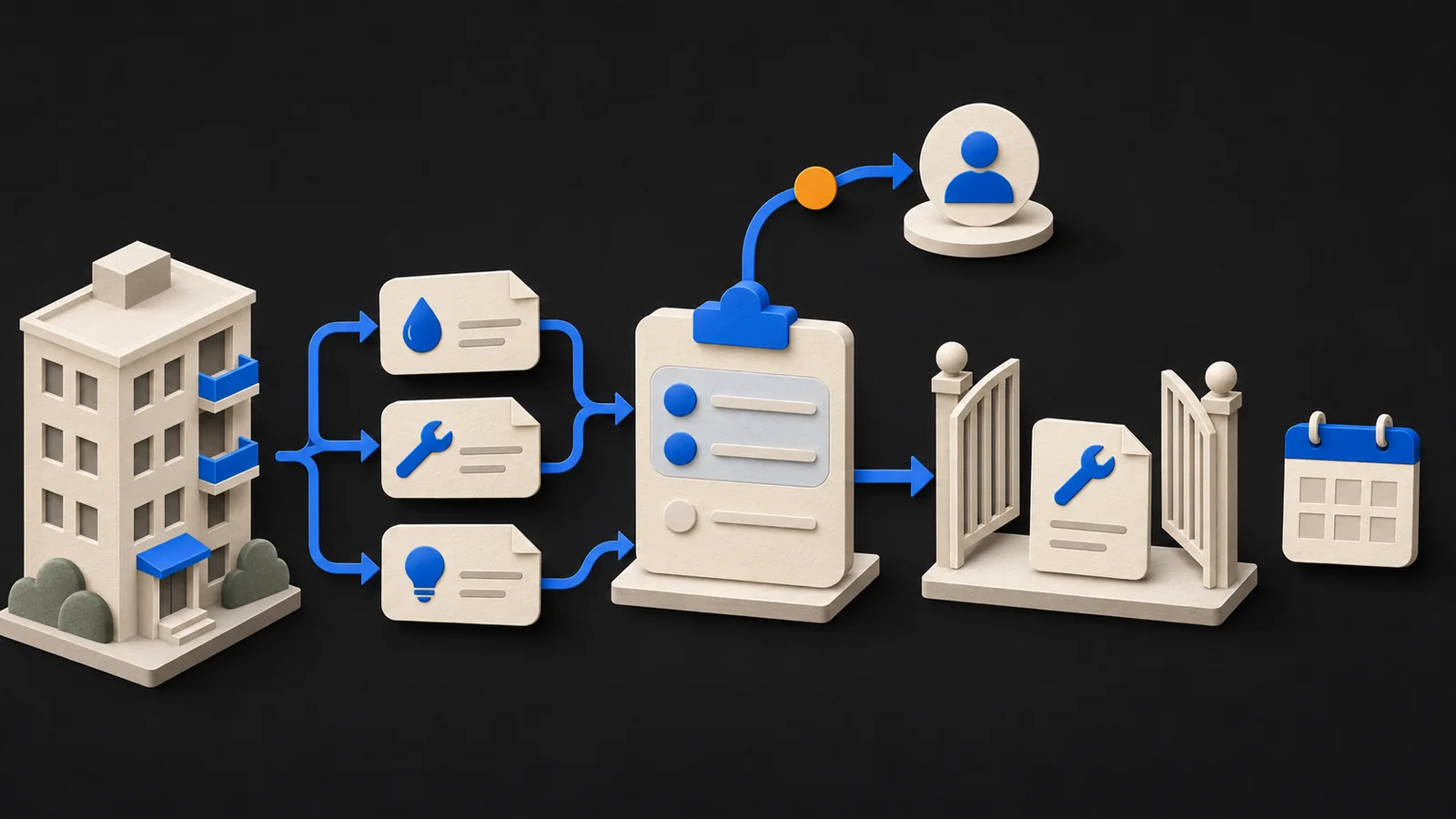
Triage chooses the next action; it does not complete the repair
A shared inbox is a poor maintenance queue when a single unread flag stands for everything from an unverified address to a contractor awaiting access. The first useful output is a dependable case with source evidence, a verified or unresolved location, a named coordinator, an explainable route and an explicit next action.
Keep four objects distinct: the incoming report, the maintenance incident it may describe, the work order authorizing a defined job, and the booking accepted for that job. Three residents can describe one incident. One report can contain two unrelated problems. A work order can exist without a confirmed appointment. These relationships are more useful than a single ticket count.
Start with the workflow mapping guide to identify the actual inbox, portal, property register, coordinator, on-call coverage and destination system. Agree on the evidence and accepted next action at each handoff before connecting the systems.
Capture enough evidence to route the report without guessing
Retain the original message and received time, channel and event identifier, reporter contact route, property reference, unit or common-area location, reported symptoms, reported change over time, access information and any attachments. Keep source wording beside a generated summary so a coordinator can inspect what the resident actually said.
Mark each important fact as reported, verified, conflicting or unknown. A resident's description is evidence of what was reported, not a technical diagnosis. A photo may support location or visible condition but cannot establish that unpictured areas are safe. Missing photographs should not prevent the approved escalation path from running.
An address alias or partial unit number should create a location-resolution task. Do not select the nearest known property merely to satisfy a required field. Preserve the report and route it to a responsible person while the location is clarified; uncertainty must remain visible to anyone considering dispatch.
| Evidence | Useful decision | What it does not establish |
|---|---|---|
| Source event and original report | Replay detection and traceable wording | Whether another message describes the same incident |
| Property, unit and affected area | Route to the correct portfolio and location | Access permission or the cause of the issue |
| Symptoms and changes | Apply approved screening and review rules | Technical diagnosis or proof of safety |
| Reporter and access information | Who can clarify and what access is proposed | Blanket permission to enter or a confirmed visit |
| Coordinator and next action | Who must act and when to check progress | Contractor acceptance or repair completion |
Worked example: six events, one unresolved change and no confirmed visit
The packet uses building P-410, unit 204 and incident M-410. At 08:05 a portal report describes a recurring drip beneath the sink. A coordinator has acknowledged ownership, but access is unconfirmed. An exact delivery replay arrives at 08:06. At 08:12 an email cites M-410 and repeats the same condition; its link to the incident is confirmed without creating a second job.
At 08:18 another report cites M-410 but says the flow has increased and now reaches the hallway. That is new evidence. The example policy routes every changed-condition flag to the designated on-call review channel without waiting for duplicate or location clarification. The coordinator must apply the property's actual escalation procedure; the reference packet does not decide an emergency category or instruct a repair.
A separate 08:20 report says only unit 204, with no building reference. Its location remains unknown and it is not silently attached to P-410. At 08:25 the integration preparing M-410's work order times out after submission. The destination may have accepted it. The next action is a lookup using the stable external incident reference, not an immediate second create request.
At the end of the packet, the coordinator owns reconciliation and changed-condition review. The proposed contractor has not accepted the job, access remains unresolved, and no appointment is confirmed. A polite acknowledgement must not claim that a technician is on the way.
| Event | Relationship | Next action |
|---|---|---|
| 08:05 portal evt-410-01 | New report for P-410 / 204 | Open M-410; coordinator accepts; clarify access |
| 08:06 portal evt-410-01 replay | Same source event | No second intake record; retain processing history |
| 08:12 email evt-410-02 | Confirmed related report citing M-410 | Retain source; link to incident; no new job |
| 08:18 portal evt-410-03 | Same incident, changed condition | Preserve new evidence; send owned on-call review |
| 08:20 email evt-410-04 | Location unresolved | Assign clarification; do not guess building |
| 08:25 integration evt-410-05 | Work-order write outcome unknown | Reconcile external reference before retry |
Download the worked example
- Complete source events, example policy and expected states
- Completed event and coordinator register
- Dispatch-readiness and ownership checklist
- Eight replay, escalation, access and recovery tests
Adapt these working structures to your process. They are examples, with no claimed client results or production accuracy measurements.
Keep escalation screening outside the duplicate-suppression gate
Use the property's approved urgent-reporting procedure and maintain the direct contact route outside the automated intake form. A resident must not need a model to finish classifying a message before reaching that route. The workflow should expose missing on-call coverage and failed notifications to an accountable fallback.
This article addresses administrative routing, not building safety assessment or the legal classification of urgent repairs. Have the responsible property and safety personnel review escalation rules before launch. For Manitoba properties, consult the Residential Tenancies Branch's repairs resources and applicable requirements rather than copying a universal deadline from a software template.
The example applies a deliberately conservative administrative rule: a report flagged as changed or unclear enters human review even when it shares an incident reference. It supplies no universal response interval. Configure actual response and escalation targets with the responsible team, coverage and applicable obligations; an automation timer cannot create coverage that does not exist.
- Retain the reportStore the source, event identity, received time and reported location.
- Run approved escalation screeningRoute changed or unresolved conditions to covered human review without waiting for deduplication.
- Resolve identity and relationshipsSeparate source replays, related reports, new incidents and uncertain locations.
- Accept ownershipConfirm a coordinator and next action; use an authorized fallback when coverage fails.
- Prepare and reconcile the handoffCheck location, access, scope and acceptance; verify the work-order result and any booking separately.
Require a real handoff before claiming a visit is booked
Prepare an inspectable handoff: verified destination location, reported issue and evidence, the coordinator's current routing decision, authorized scope, access arrangements, contractor requirements and the exact next action. Use the permissions and access rules that apply to the property; a request to call after 16:00 is not permission to enter at any time.
Separate a contractor invitation from acceptance and acceptance from a booking. The system may have sent a job offer while nobody has taken responsibility. A proposed time window is not a confirmed slot. Present these states explicitly in internal and resident messages so a generated update does not turn an administrative intention into a promise.
Check the destination before retrying a timed-out create. If the stable external incident reference returns one verified work order, reconcile that record. If the lookup is unavailable or returns conflicting candidates, keep an owned reconciliation task. An unknown result is not proof that the first create failed.
After authorized work is performed and evidenced, use property work-order invoice matching to compare the contractor's billing with the authorized scope and completion record. Intake triage does not establish that later work is complete or payable.
Use AI for evidence preparation, with explicit state and authority controls
AI can extract candidate locations, summarize a message thread, highlight changed wording, classify a likely work category and draft a clarification for review. Require source references for material facts and a visible unknown state. Do not use model confidence as permission to dismiss a changed-condition report or invent access consent.
Technology references checked November 2, 2026: Microsoft Dynamics 365 Field Service documents creation, scheduling, field work and completion review as separate stages. Its work-order and booking model is a useful implementation reference; map the actual property platform's capabilities rather than assuming a connector enforces the same lifecycle.
OpenAI's current catalog includes GPT-6.1 Sol and GPT-6 Astra. Evaluate candidates for source-grounded extraction and changed-report summaries with permissioned records. This packet benchmarks neither model. Keep identity keys, accepted ownership, allowed status transitions and update reconciliation explicit outside generated prose.
Test both incorrect escalations and missed material changes, reviewer corrections and time spent resolving unknown locations. Compare model versions against the same reviewed cases before changing a live route. An apparently shorter queue can be worse if reports were linked away, closed prematurely or left without a next action.
Pilot one building and measure accepted actions, not just faster replies
Run the eight downloadable tests with the coordinator and on-call owner. Start in preparation mode: the workflow drafts the case, relationship and handoff while the team confirms the decision. Rehearse missing coverage, a changed condition on an old incident and an uncertain destination write before allowing permitted live updates.
Track time to accepted coordinator ownership, unresolved-location age, changed-condition review age, unaccepted contractor invitations, false incident links and uncertain-write reconciliation. Show the denominator and the outstanding items. Acknowledgement speed alone cannot tell you whether someone is responsible for the next action.
OpSmith's property management automation work can connect resident intake, property context and coordinator handoffs around your existing systems. Begin with one maintained category and the actual people authorized to route it.
For ongoing queue checks, coverage alerts and controlled changes, managed automation services can support the live workflow. Use the automation monitoring and maintenance guide to define observable business outcomes and recovery ownership before launch.
Keep unresolved handoffs visible after the run succeeds
Use the workflow automation monitoring checklist to track changed-condition review, unaccepted contractor invitations and uncertain destination writes as distinct owned states rather than a single successful-run percentage.
Frequently asked questions
Should two reports about the same unit become one ticket?
Only after verifying their property, location and incident relationship. Retain each original report and any new information. A source-event replay can avoid another intake write, while a separate report about the same incident may still require a new review action.
Can an AI model decide whether a maintenance issue is safe to defer?
This workflow does not authorize that decision. Apply the property's approved escalation procedure and responsible human review. Missing details, a likely duplicate or a confident summary must not block the direct urgent-reporting route or erase a reported change.
Does a maintenance request give permission to enter?
Do not infer blanket access permission from intake. Record the reported availability and access details, then verify the applicable permission and notice requirements through the authorized property process before communicating a confirmed visit.
What should happen when creating a work order times out?
Retain an unknown outcome and reconcile the destination using a stable external reference before retrying. If lookup is unavailable or conflicting, assign the reconciliation to an owner. Do not create another job or tell the resident that a visit is booked merely because the request was submitted.
Sources and further guidance
These official references provide relevant technical, privacy, risk-management or accountability guidance. OpSmith applies the useful principles to the operation of one business workflow.
- Work-order architecture, booking and completion reviewMicrosoft Learn
- Repairs resources and applicable tenancy guidanceManitoba Residential Tenancies Branch
- Current model catalogOpenAI