
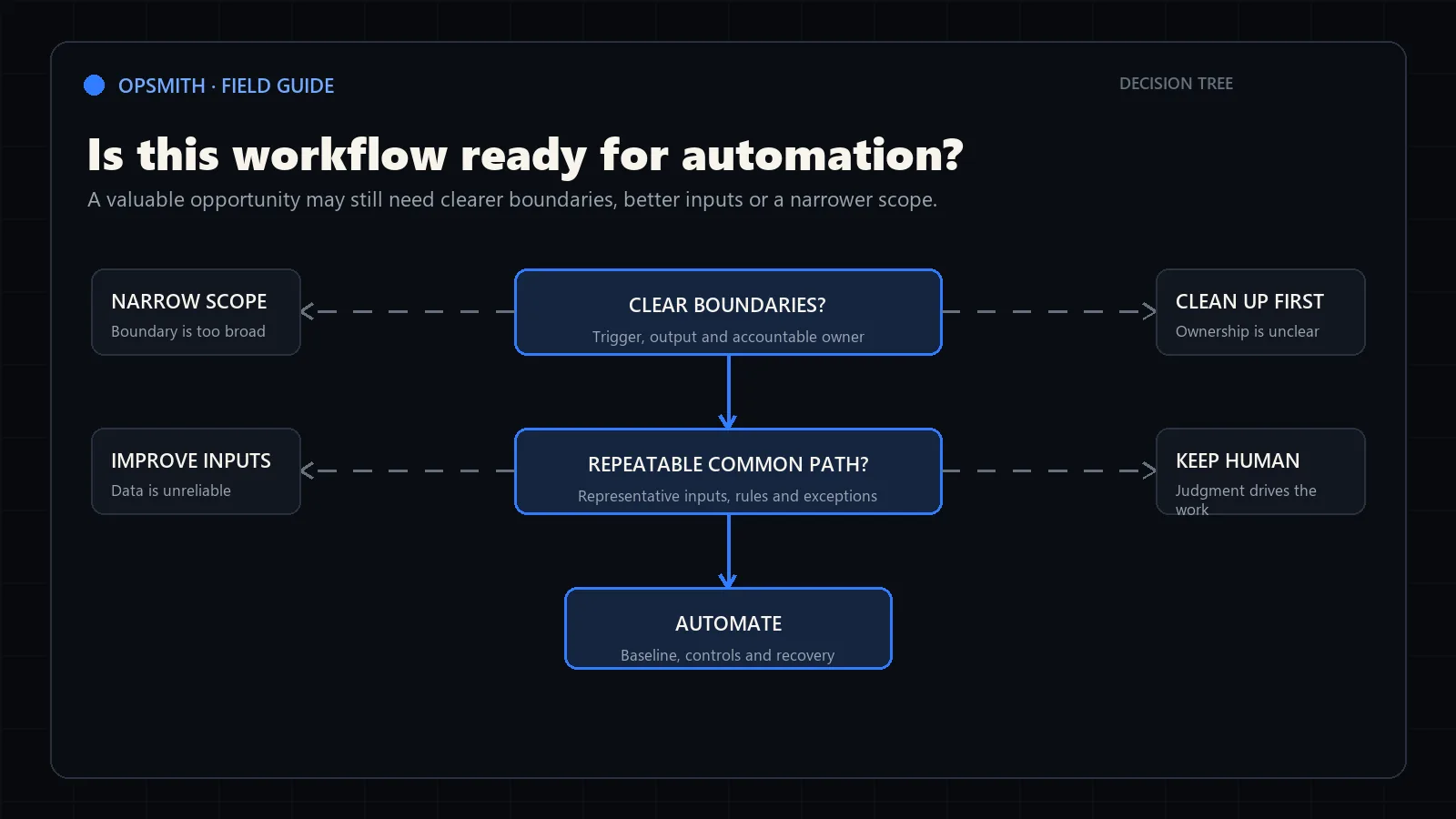
1. The workflow has clear boundaries
Name the event that begins the process and the business result that ends it. If the team cannot agree on those boundaries, implementation estimates will hide different assumptions.
Choose one workflow, not a department. ‘Customer onboarding’ is usually too broad; ‘from signed agreement to a complete onboarding record and assigned kickoff owner’ is testable.
Trigger
The starting event is observable and supplies enough context to begin.
Output
A successful run produces a specific record, draft, routing decision or notification.
Owner
One person or role is accountable for the outcome.
Frequency
The team can estimate how often the workflow runs and when demand peaks.
2. Rules and inputs can be inspected
Automation depends on the inputs available at the moment each decision is made. List the source systems, files, messages and fields. Mark which information is required, optional, sensitive or frequently missing.
Do not confuse a knowledgeable employee’s ability to infer missing context with a documented rule. If a decision relies on experience, keep an approval point or narrow the automated step.
Representative samples
The team can provide normal, messy and unusual examples—not only the cleanest cases.
Access
The necessary information can be accessed lawfully and through dependable technical methods.
Rule clarity
Common decisions can be explained and tested against examples.
Data quality
Missing and conflicting fields are visible enough to route safely.
3. Exceptions and consequences are understood
Every production workflow encounters cases that do not match the common path. Readiness means the system can recognize uncertainty, contain the item and ask the appropriate person to decide.
List the consequences of a wrong action. An internal draft can tolerate a different control model than an approved payment, contractual commitment or customer-facing statement.
Exception categories
Missing data, duplicates, source conflicts, integration failures and unusual requests are named.
Human decision
The person authorized to resolve each consequential exception is known.
Recovery
A failed run can be retried or completed manually without losing the source.
Auditability
The team can determine what the system received, decided and changed.
4. Success has a baseline and an owner
Record current performance before implementation. Useful measures include handling minutes per item, elapsed cycle time, backlog, rework, missing-information rate and the number of manual handoffs.
Readiness is not a perfect score. If the workflow has clear boundaries, usable evidence, manageable exceptions and an accountable owner, remaining gaps can become explicit design requirements.
Baseline
Current volume, labour, delay and rework are estimated from a defined period.
Target
The desired operational change is measurable and connected to business value.
Adoption
The people who will review or use the output are involved in testing.
Decision
The assessment ends with automate, clean up first, narrow the scope or leave human.