
- Treat the document as the workflow’s input—not the finished result. The useful outcome is a verified record, decision, draft or routed action.
- Separate text capture, document classification, field extraction and business validation so each stage can be tested and improved independently.
- Design low-confidence cases, missing information and system failures before launch, with a named reviewer and a safe recovery point.
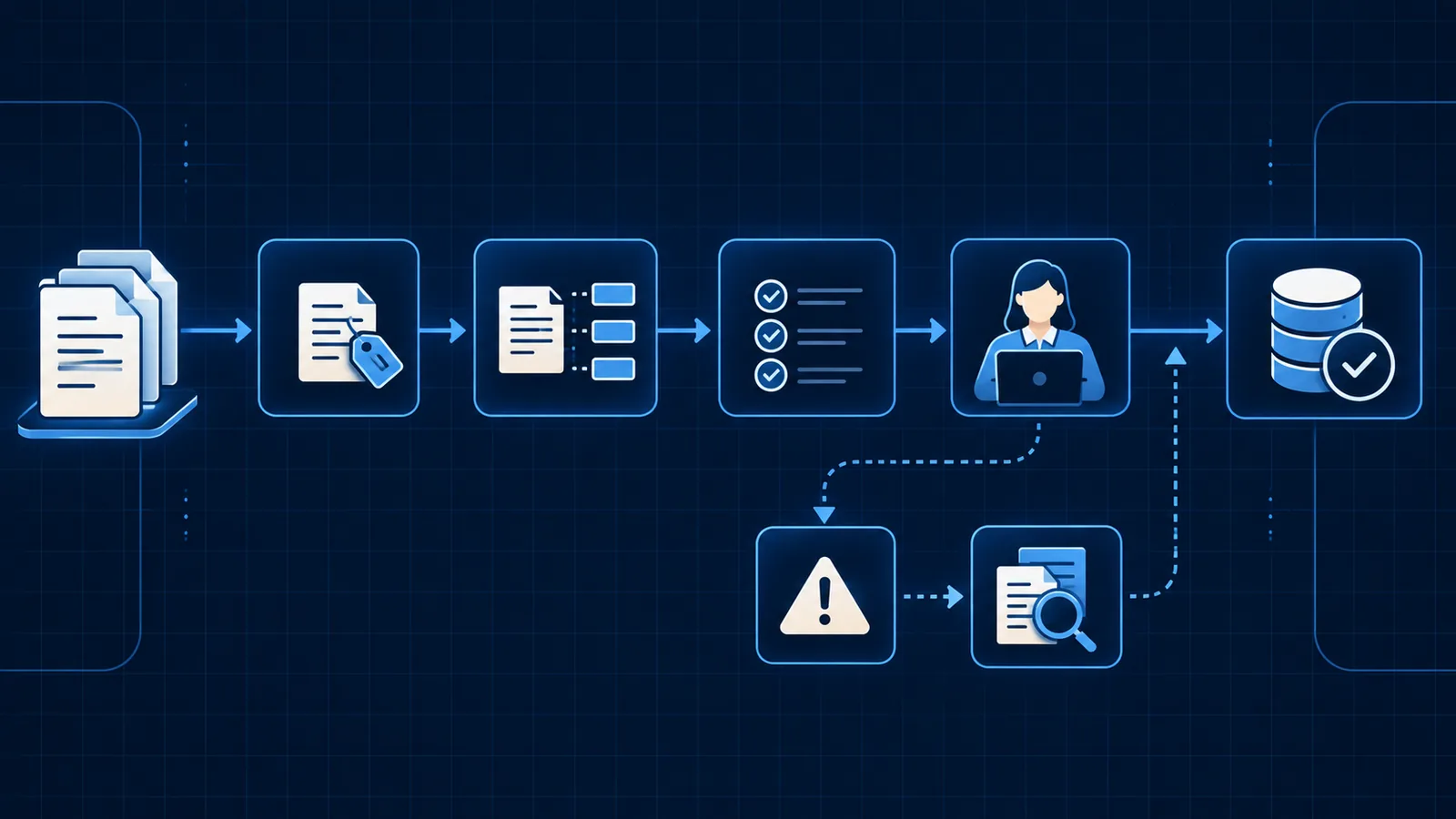
Start with the business outcome, not the extraction model
A document processing workflow begins when a file or image arrives and ends when the business has a usable result. That result may be an approved invoice record, a complete customer file, a routed service request or a draft that an authorized person can accept. Extracted text by itself is only an intermediate output.
Define the trigger, final destination, accountable owner and consequence of an incorrect update before selecting software. Then collect representative documents from the normal path and the difficult edge cases: rotated scans, handwritten notes, multiple attachments, unfamiliar layouts, duplicates and incomplete forms.
Trigger
Name the inbox, upload, scan, portal event or system handoff that starts the workflow.
Required result
Specify the fields, decision, draft or routing action the business actually needs.
Destination
Identify the CRM, accounting platform, case system or controlled queue that receives the result.
Owner
Assign responsibility for the business outcome, review rules and acceptable residual risk.
Control intake before classifying the document
Document intake needs more than a watched folder. Record where the document came from, when it arrived, which customer or case it may belong to and whether the same file has already entered the process. Preserve the original so later corrections can be traced back to evidence.
Classification decides which processing path applies. A mixed attachment may contain an invoice, purchase order and delivery receipt; a generic extractor should not silently treat the entire file as one document. Split and classify first, then route each type to an approved schema and rule set.
Source identity
Preserve the sender, channel, received time and original file reference.
File controls
Check format, readability, page count, password protection and obvious corruption.
Duplicate detection
Compare stable identifiers and file evidence before creating another downstream record.
Document class
Assign an approved type or route an unknown class for review rather than guessing.
Extract the fields the workflow needs and preserve their source
Optical character recognition makes printed or handwritten content machine-readable. Intelligent processing adds structure: it can identify tables, key-value relationships and document types, then map useful entities into a consistent schema. The distinction is explained in OCR vs intelligent document processing.
Store the raw value, normalized value and source location for every material field. A date converted into a standard format should still point back to the date on the page. Source traceability makes review faster and prevents a clean-looking database value from becoming detached from the document that supports it.
Schema
Define the required and optional fields for each approved document type.
Normalization
Convert dates, amounts, addresses and identifiers into formats the destination accepts.
Source reference
Retain the page, region or text span behind consequential extracted values.
Confidence
Use field-level evidence as one routing signal, never as proof that the value is correct.
Validate business meaning before accepting extracted data
A correctly read value can still be wrong for the business. The amount may not equal the line items, the vendor may not match the purchase order, a required identifier may be absent or the same invoice number may already exist. Validation must test the extracted result against deterministic rules and available source records.
Create a validation matrix that names each rule, its evidence, the consequence of failure and the authorized resolution. Use the document data validation lab to test required fields, arithmetic, duplicate and source checks against fictional invoices, then export the rules and labelled test results.
Completeness
Confirm every field required for the downstream action is present.
Format and range
Check dates, identifiers, allowed values and reasonable numeric boundaries.
Cross-field consistency
Compare totals, dates, names and relationships within the document.
External evidence
Match against approved vendor, customer, order or account records when available.
Give uncertain documents a decision path and a recovery path
A review queue should tell the reviewer what failed, show the original evidence beside the proposed value and offer the approved actions. Asking someone to inspect the entire document without explaining the exception recreates the original manual workload inside a new interface.
Keep the item contained until the issue is resolved, then resume from the last safe step without duplicating earlier effects. Use the workflow exception recovery runbook builder to define who investigates a failed or uncertain system update, what evidence they need and how the document returns to a safe processing step.
Reason
Explain the failed rule, uncertain field or unavailable dependency.
Evidence
Present the source region, extracted value and relevant business record together.
Authority
Route the decision to a person who is permitted to correct, approve, reject or escalate it.
Safe resume
Continue from a known state and verify the final destination without duplicate updates.
Write to the business system only after the acceptance gate
The destination update should be an explicit, observable step. Record what was created or changed, which source document supported it and whether the result was automatic or human-approved. Use idempotency or another duplicate-safe design so a retry does not create a second record or payment instruction.
Measure the operating result by stage. Track unreadable inputs, unknown classifications, critical-field corrections, validation failures, review time, exception recurrence and successful destination updates. These signals reveal whether the next improvement belongs in intake, extraction, rules, training examples or the upstream business process.
Acceptance gate
Require all critical validations and necessary approvals before a material write.
Audit trace
Connect the original file, extracted proposal, validation result, reviewer and final update.
Outcome measure
Confirm that a correct record or action reached the intended destination on time.
Controlled change
Retest representative normal and exceptional documents before changing the workflow.
Choose a narrow first document workflow
Begin with one document type, one intake channel, one destination and a defined review path. A narrow boundary creates a testable accuracy requirement and makes it possible to observe whether the workflow saves handling time without creating hidden correction work.
OpSmith’s document processing automation service connects extraction to the validation, approval, exception and system-update controls required for an operating result.
Frequently asked questions
What is a document processing workflow?
A document processing workflow is the complete operating path that receives a document, identifies its type, extracts required information, validates that information, routes uncertainty for review and writes an approved result to the appropriate business system.
Is OCR enough to automate document processing?
Usually not. OCR can make text machine-readable, but the workflow still needs document classification, field mapping, business-rule validation, exception handling, approval and a controlled system update.
Which documents are good candidates for automation?
Good candidates arrive frequently, contain recurring information, follow reasonably stable rules and create a useful downstream action. Representative examples and known exceptions should be available before implementation.
When should a person review an extracted document?
Human review is appropriate when required information is missing, sources conflict, confidence is below an approved threshold or the resulting action carries material financial, contractual or customer consequences.
How should document processing accuracy be measured?
Measure critical-field accuracy, validation failures, correction rate, exception rate and the accuracy of the final business-system record. A single document-level accuracy percentage can hide mistakes in the fields that matter most.
Sources and further guidance
These official references provide relevant technical, privacy, risk-management or accountability guidance. OpSmith applies the useful principles to the operation of one business workflow.
- Document AI overviewGoogle Cloud
- Document Intelligence overviewMicrosoft Learn
- PIPEDA fair information principle: limiting collectionOffice of the Privacy Commissioner of Canada