
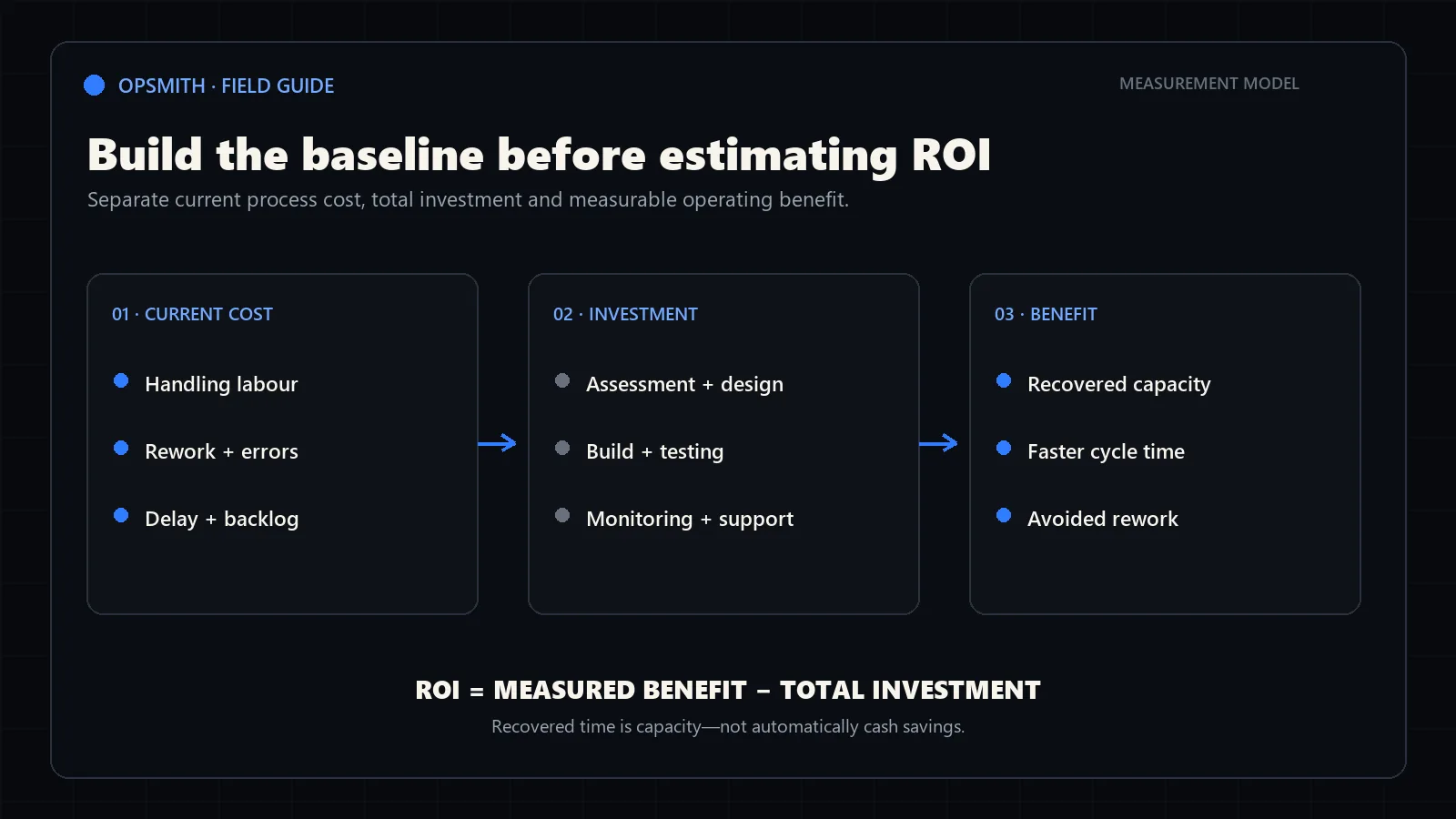
Calculate the current process cost first
ROI starts with the cost of the workflow today, not an assumed percentage of jobs eliminated. Estimate the time spent receiving, copying, checking, clarifying, approving and correcting each run.
Use a blended loaded hourly cost for the people involved. Include wages plus the employment costs your business normally uses for planning. Keep the calculation consistent rather than trying to make it artificially precise.
Handling labour
Weekly hours spent performing and supervising the process.
Rework
Time and direct cost caused by missing, incorrect or duplicated information.
Delay
Measurable cost of backlog, slow response or work waiting for a handoff.
Volume
The number and seasonality of workflow runs behind the estimate.
Estimate the operational change by step
Do not apply one optimistic savings percentage to the entire process. Mark which steps could be removed, shortened, shifted to exception-only handling or left unchanged.
Separate recoverable capacity from cash savings. Removing ten hours of repetitive work may allow the same team to handle more volume without immediately reducing payroll.
Removed work
A step no longer needs routine manual handling.
Reduced work
Automation prepares the item, but a person still reviews or completes it.
Shifted work
The team handles exceptions instead of every standard case.
Unchanged work
Judgment, approval or relationship work remains with people.
Include the full implementation and operating cost
Compare the expected operational benefit with discovery, design, integration, testing, training and rollout—not only the visible build. Include monitoring and maintenance when the workflow will depend on changing systems, data or business rules.
Compare the editable conservative and expected cases above. Change one assumption at a time to see which facts determine the result. The labels do not enforce a particular outcome: if your conservative inputs are more optimistic, its result may be higher.
Initial investment
Assessment, design, build, integration, testing and adoption.
Ongoing cost
Software, usage, monitoring, support and controlled improvement.
Ramp
Time required for testing, training and reliable adoption.
Residual cost
Human review, exceptions and work that correctly remains manual.
Formulas, assumptions and limits
Baseline annual cost = weekly manual hours × loaded hourly cost × active weeks + monthly other direct costs × 12. Do not include the same rework labour in both inputs.
At full adoption, annual released hours = (current weekly hours − remaining weekly hours) × active weeks. Labour capacity value = released hours × hourly cost. Cash benefit = labour value × cash-realization percentage + annual other direct costs × reduction percentage. Retained capacity value is the labour value not realized as cash.
Benefits ramp linearly: month number divided by ramp months, capped at 100%. A zero-month ramp means full benefit from month 1. Annual hours and direct costs are spread evenly across 12 months, including inactive weeks. Upfront investment is paid at month 0; the full monthly operating cost starts in month 1, even during the ramp.
First-year net cash benefit = the first 12 months of cash benefit − implementation investment − 12 months of operating cost. Cash ROI = net cash benefit ÷ that total investment × 100. Capacity-inclusive ROI uses cash benefit plus retained capacity value in the numerator. With no investment entered, ROI is undefined rather than infinite.
Payback is evaluated at each month-end for 60 months, using the cumulative benefit less all entered costs. It requires positive steady-state net benefit. Capacity-inclusive recovery values released time; it is not cash payback. Values are rounded only for display.
This is an undiscounted, constant-volume planning model, not NPV, a quote or a staffing recommendation. It excludes tax, financing, inflation, seasonality within a year, growth, unentered costs and pre-launch delays. Start the timeline at rollout and include pre-launch spending in implementation investment. Add only incremental expenses and evidence-backed benefits; validate the assumptions with a pilot.
Worked example: positive capacity value, no cash payback
The illustrative expected case starts with 12 hours a week at $35 for 48 weeks, plus $250 a month in other direct costs: a $23,160 annual baseline. Automation leaves 4 hours a week of human work, reduces the other direct costs by 50%, costs $6,000 to implement and $150 a month to operate, and reaches full adoption in month 3.
That ramp releases 352 hours in year one. With no labour spending reduction claimed, the model produces $1,375 in cash benefit and $12,320 in retained capacity value. Against $7,800 of first-year investment, net cash benefit is −$6,425 (−82.4% cash ROI). Net combined value is $5,895 (75.6% capacity-inclusive ROI).
The capacity-inclusive investment is recovered in month 7, but there is no cash payback: steady-state direct cash savings of $1,500 a year do not cover $1,800 of recurring costs. This is why a time-saving workflow can have operational value without funding itself through lower spending. These are demonstration inputs, not a client result.
Frequently asked questions
Does time saved by automation count as cash savings?
Only when it reduces actual spending. By default, the calculator assigns 0% of released labour value to cash. Time redeployed to other work is shown as retained staff capacity value, not cash savings or a recommendation to remove a role.
How is automation ROI calculated?
First-year cash ROI is (cash benefit over the first 12 months minus implementation and 12 months of recurring cost) divided by that same investment, multiplied by 100. Capacity-inclusive ROI adds the remaining labour capacity value without counting the cash portion twice. Neither result is a guarantee.
Why might the calculator show no payback?
Cash payback is unavailable when steady-state cash benefit does not exceed ongoing costs. If net benefit is positive but the upfront investment has not been recovered within the 60-month calculation, the result says Beyond 60 months. A positive capacity-inclusive result can still have no cash payback.