
- Start with a completed case and trace it from the real trigger to the useful outcome.
- Give each step an input, action, output and owner; separate stable rules from accountable judgment.
- Keep the normal path, exceptions, controls and measurement points on one usable model.
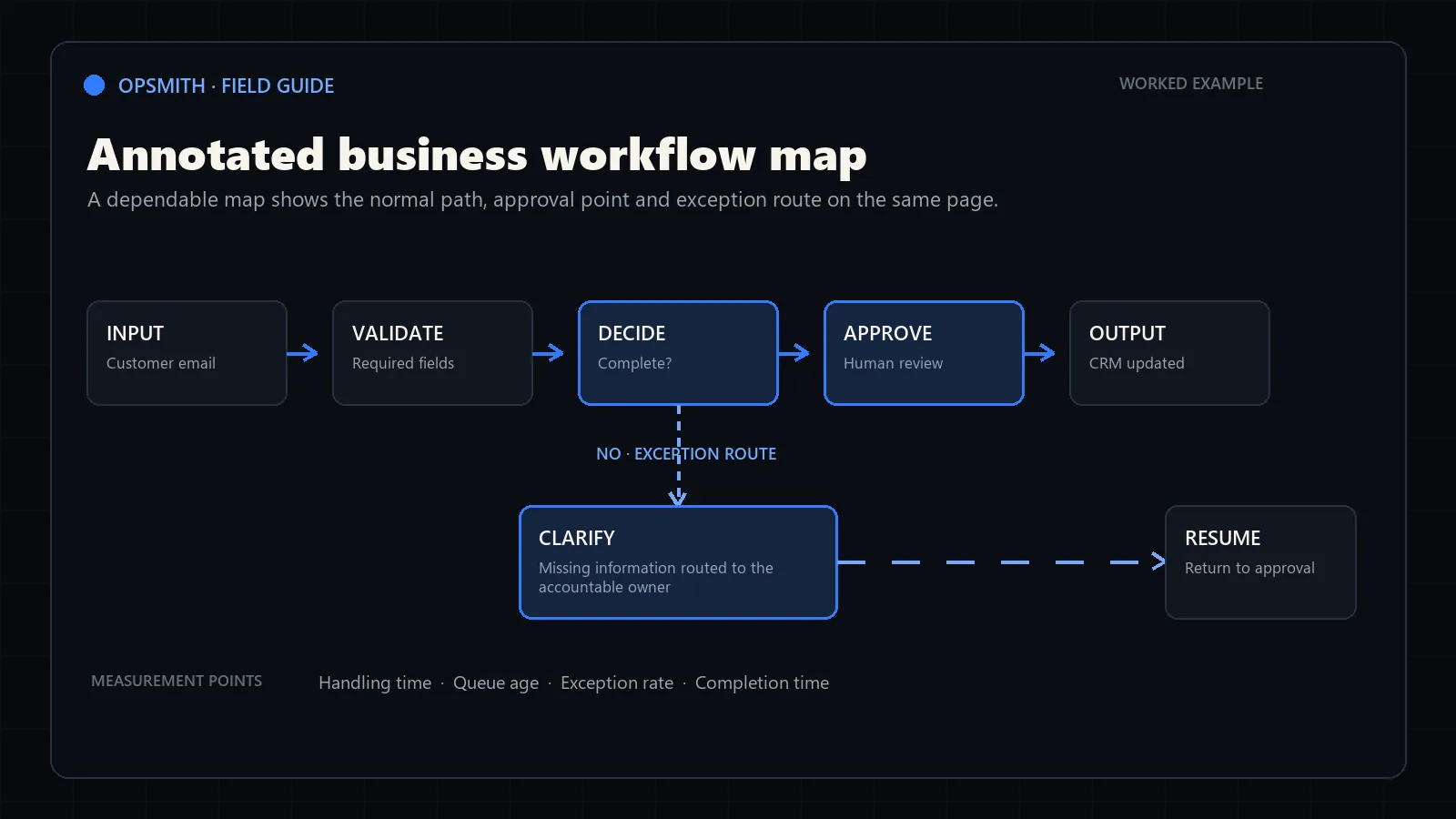
Observe the real workflow
Begin with a recent completed item and follow it from trigger to outcome. Ask the person doing the work to show where information arrives, what they check, what they change and what causes them to pause.
A policy document describes the intended process. A useful current-state map records the operating process, including copy-paste work, private trackers, email approvals and calls used to resolve unclear cases.
Trigger
What event starts the work, and how does the team know it happened?
Actors
Who performs, approves, receives or depends on each step?
Systems
Which inboxes, files, portals, spreadsheets and applications are touched?
Evidence
Which recent items prove how the normal and exceptional paths work?
Give every step an input, action and output
Write steps with concrete verbs: receive request, validate account, draft quote, approve exception, update CRM. Avoid vague labels such as ‘process information’ that hide several decisions.
For each step, record the input received, the action performed, the output created and the next owner. This exposes duplicate entry and handoffs where context is routinely lost.
Input
The file, message, field or event required to perform the step.
Action
What the person or system actually does with the input.
Output
The changed record, decision, draft, notification or routed item.
Handoff
Who receives the result and how they know it is ready.
Separate rules from judgment
A decision diamond on a diagram is not enough. Write the rule, information used and authorized decision-maker. Then test the rule against representative cases.
Rules that are stable and evidence-based may be automated. Decisions involving ambiguity, material commitments or professional judgment should use human-in-the-loop automation until evidence supports a different control.
Rule-based
The same observable facts lead to the same approved outcome.
Judgment-based
Context, negotiation, risk appetite or professional expertise changes the answer.
Approval
A named role must accept the prepared action before it continues.
Escalation
A defined condition moves the item to someone with broader authority.
Draw the exception paths on the same map
Do not put exceptions in a note at the bottom. Show where missing information, duplicates, source conflicts and system failures leave the common path. Name the holding state and the person who owns the next action.
The completed map should be readable by the people doing the work. Review it with them, correct it using real examples and record the baseline measures at the steps where time or rework accumulates.
This current-state model is the design foundation in the broader guide to how to automate business processes. It should be stable enough to support a readiness decision, but maintained as evidence reveals the real work.
Detect
Define the evidence that tells the workflow the common path cannot continue.
Contain
Preserve the source and prevent an uncertain item from changing downstream records.
Resolve
Route the item with enough context for a person to decide efficiently.
Learn
Record recurring exceptions that may justify a rule or process change.
Frequently asked questions
What is business process modeling for automation?
It represents a business process so automation decisions can be based on real triggers, inputs, actions, decisions, ownership, systems, exceptions and outcomes.
Do I need BPMN to map a process for automation?
Not always. BPMN is a useful shared standard, but a simpler consistent model can work if it clearly shows events, activities, decisions, flows, ownership and exceptions.
Should the current state or future state be mapped first?
Map the current state first. It reveals hidden handoffs, workarounds and exceptions that the future-state design must remove, control or preserve deliberately.
Who should validate a process model?
Include the people who perform the work, approve consequential decisions, own the outcome and support connected systems. Validate it against recent real cases.
Sources and further guidance
These official references provide relevant technical, privacy, risk-management or accountability guidance. OpSmith applies the useful principles to the operation of one business workflow.
- Business Process Model and Notation (BPMN)Object Management Group
- Business process management stepsMicrosoft