
- Monitor whether the expected business outcome completed—not only whether the automation stayed online.
- Give every alert an impact, severity, owner and recovery action.
- Control changes to rules, prompts, models and integrations with representative regression tests and rollback.
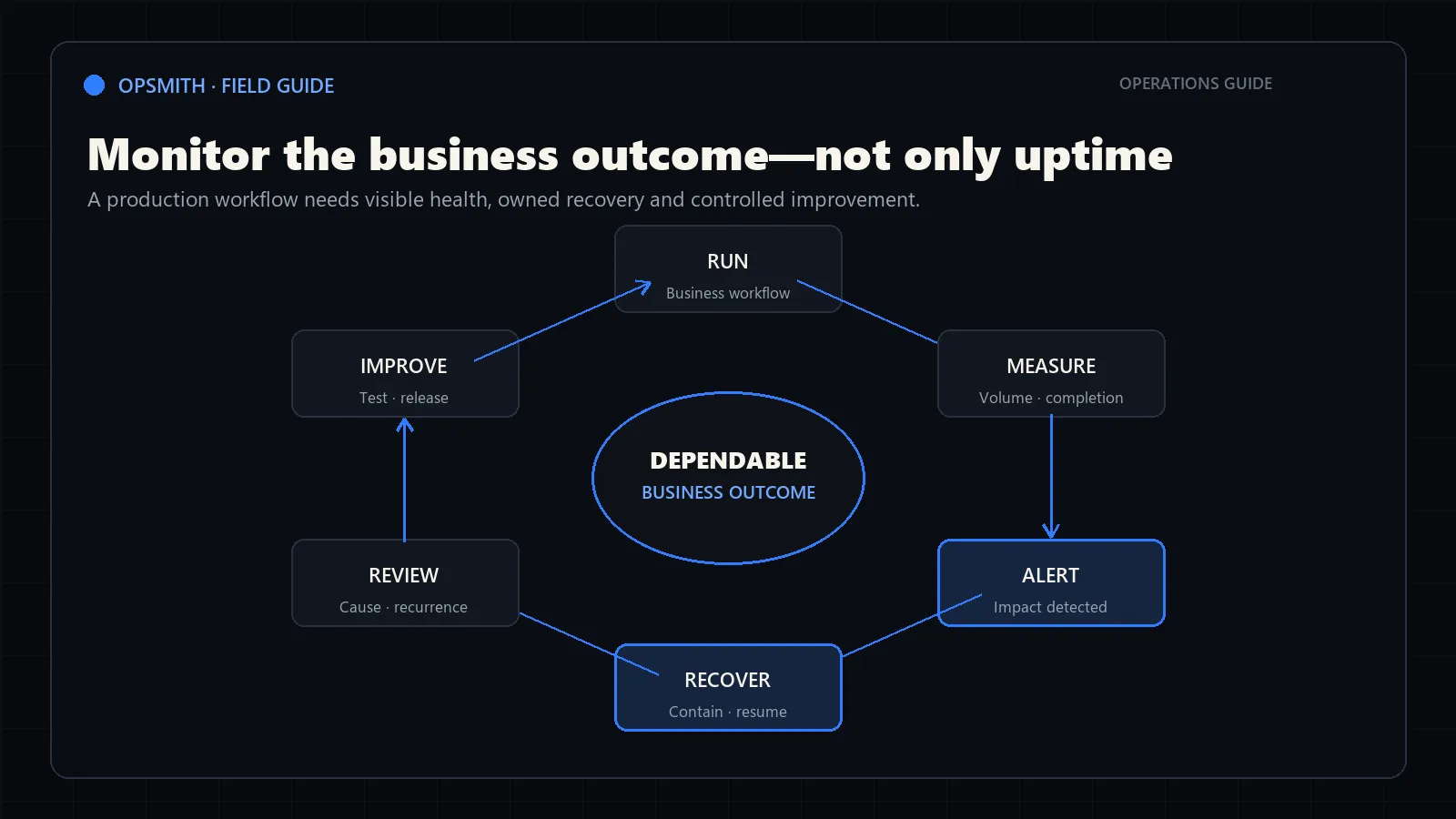
Monitor business outcomes—not only uptime
A workflow can be technically online while producing stale records, growing an exception queue or failing to deliver useful outputs. Monitor whether the expected business result completed within the required time.
Outcome monitoring is one operating control in an AI governance framework. The business owner defines acceptable performance; monitoring provides evidence that those expectations still hold.
Define a small set of signals around volume, completion, delay, exceptions and downstream acceptance. Compare them with the baseline and the normal operating range.
Runs started
Expected versus actual workflow volume by source and period.
Runs completed
Items reaching the defined business outcome without unresolved failure.
Cycle time
Elapsed time from trigger to useful output, including review waits.
Exception health
Rate, age and category of items that leave the standard path.
Make alerts actionable
An alert should tell the owner what failed, which items are affected, whether the impact is contained and what action is available. Avoid sending every technical warning to business users.
Set urgency from consequence and backlog growth. One delayed internal summary may wait for business hours; a customer-facing duplicate action may require immediate containment.
Signal
Define the observable condition that indicates business impact.
Severity
Connect urgency to consequence, affected volume and recoverability.
Owner
Assign the person or team responsible for the first response.
Runbook
Provide containment, diagnosis, retry and escalation instructions.
Build a small operating dashboard
A useful dashboard helps an owner decide whether the workflow is healthy and where attention is required. Begin with a small set of measures tied to the business outcome instead of collecting every available technical signal.
Include review-queue age and correction rate when the workflow uses human-in-the-loop controls. Include exception categories and recovery results when work can leave the standard path.
Volume
Expected and actual runs by source, period and workflow version.
Completion
Share of runs reaching the verified business outcome within the service expectation.
Control load
Items waiting for review, correction or escalation, including their age.
Recovery
Failures contained, time to restore and affected items verified after recovery.
Design recovery before a failure
Preserve the original input and each completed step so the workflow can resume without repeating side effects. When automatic retry is safe, limit and record it. When it is not, create an explicit manual recovery action.
Practice recovery using test failures before launch. The workflow exception recovery runbook builder creates an alert template, escalation rule and verification checklist. Connect the resulting procedure to the alert that should invoke it, then test an unavailable owner and an uncertain system response.
Contain
Stop uncertain downstream actions and keep affected items visible.
Diagnose
Separate bad input, business-rule conflict, dependency failure and system defect.
Resume
Continue from the last safe point without duplicating completed actions.
Verify
Confirm the intended record, message or handoff exists after recovery.
Control changes to rules, systems and models
Business rules, source formats, integrations and AI behaviour change. Record dependencies and assign an owner who can approve updates. Test changes against representative normal and exceptional cases before production.
Use operating evidence to decide improvements. When the workflow is important or changes frequently, managed automation services provide clear ownership for monitoring, recovery and controlled improvement.
Change log
Record what changed, why, who approved it and the effective date.
Regression set
Retest representative normal, boundary and exceptional cases.
Rollback
Keep a safe way to restore the last dependable configuration.
Review cadence
Review volume, failures, exceptions and control performance on an agreed schedule.
Frequently asked questions
What should be monitored in a business automation workflow?
Monitor expected volume, verified completion, cycle time, review-queue health, exception categories, downstream acceptance and recovery results. Technical uptime alone does not prove the business outcome occurred.
Who should receive automation alerts?
Route alerts to the role that can take the first useful action. Business-impact alerts may belong to an operations owner, while dependency failures may require technical support. Every alert should state impact, containment and the next action.
How often should an automation be maintained?
Use a scheduled review based on business importance, workflow volume and change frequency, and also review whenever a rule, source format, integration, model or operating consequence changes.
What should an automation recovery runbook include?
Include how to identify affected items, contain unsafe actions, diagnose the failure category, resume from the last safe state, verify the final outcome and escalate when recovery is uncertain.
Sources and further guidance
These official references provide relevant technical, privacy, risk-management or accountability guidance. OpSmith applies the useful principles to the operation of one business workflow.
- AI Risk Management Framework CoreNational Institute of Standards and Technology