
- Contain the affected item and preserve the source before deciding whether to retry, correct or escalate.
- A timeout does not prove that an action failed. Reconcile the destination before repeating an uncertain operation.
- Assign an owner, a response target, decision authority and observable evidence of completion.
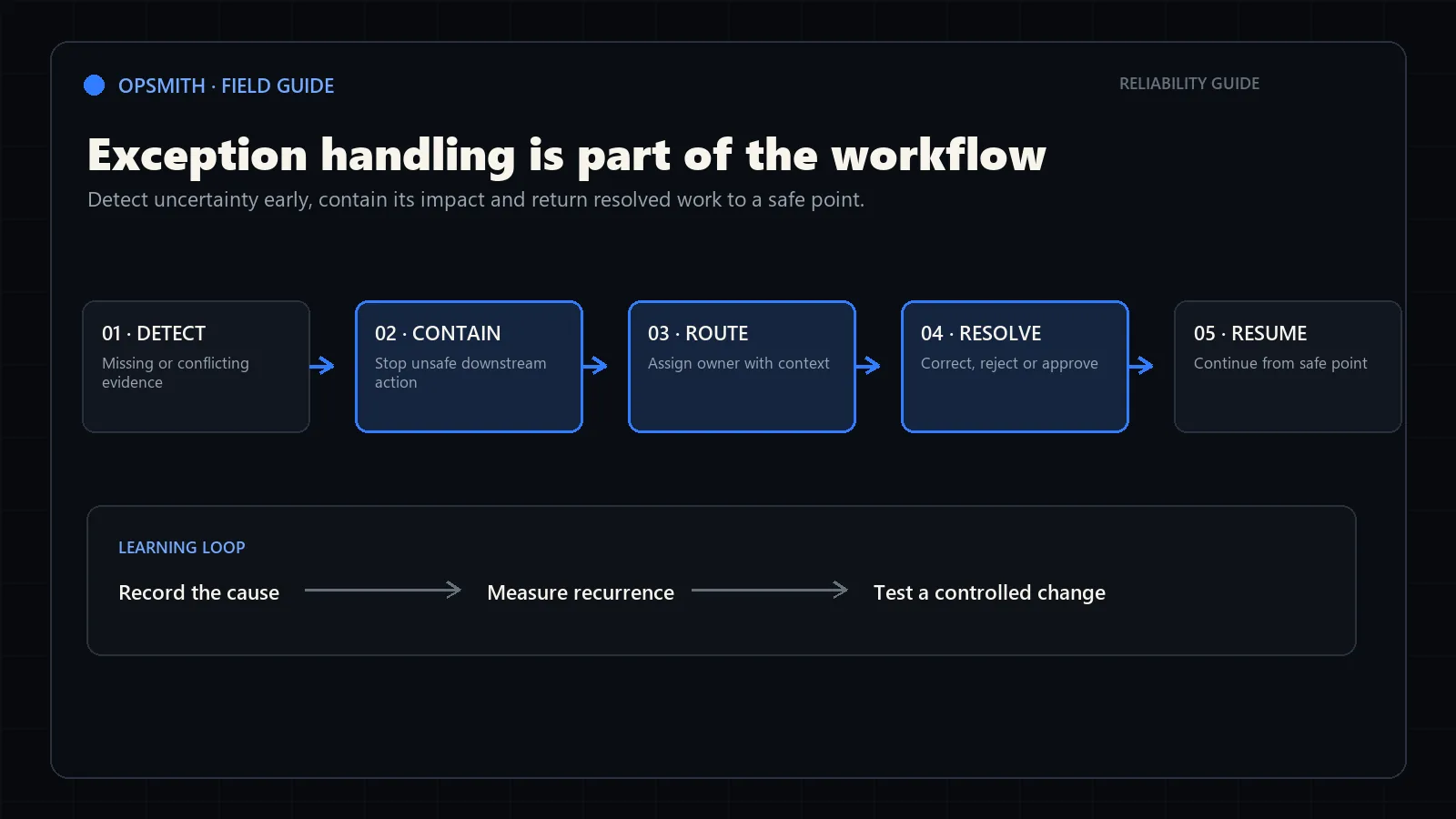
Worked example: an invoice submission times out
This illustrative example follows an invoice already approved for accounting entry. The submission times out and returns no record ID. The system may have created the record before its response was lost. Payment release remains outside this workflow.
The response target below is an example, not a benchmark. The team must agree on coverage, destination lookup behaviour and escalation before using the procedure. These decisions are also available in the invoice preset above.
1. Detect and identify
Capture the timeout, detection time, workflow run ID and the original submission reference. Keep the approved invoice and intended accounting values together.
2. Contain
Place the invoice in a recovery queue. Block another posting attempt for this invoice while the first attempt is being reconciled.
3. Assign and investigate
The accounts payable lead checks the destination using the original request reference and invoice evidence. Check for pending requests as well as completed records.
4. Choose the branch
If the matching record exists, verify and link it. If absence and no in-flight request are confirmed, resolve the cause before an authorized attempt. If still uncertain, keep the hold and escalate.
5. Escalate without releasing the hold
If no owner responds within the example target of 60 elapsed minutes, notify the finance manager and integration support. Escalate immediately if containment fails.
6. Verify and close
Confirm one correct accounting record, its supplier and amount, and the destination ID. Record the resolver, decision, recovery action and completion time.
Define an exception operationally
An exception is any item the standard path cannot complete safely. It may be bad input, an ambiguous decision, a system failure or a business case that requires different authority.
Exception handling is one control inside a broader AI governance framework. Governance defines acceptable outcomes and ownership; the exception path defines what happens when those conditions are not met.
Use categories the operation can act on. ‘AI failed’ is not useful. ‘Purchase order total does not match its line items’ tells the reviewer what evidence is in conflict and where to begin.
Input exception
A required field is missing, unreadable, duplicated or inconsistent.
Rule exception
The item falls outside an approved threshold or matches conflicting rules.
System exception
An integration is unavailable, times out or rejects the requested change.
Business exception
The request is valid but unusual enough to require judgment or authority.
Detect early and contain the impact
Validate required information before changing downstream systems. The document data validation lab demonstrates how missing identifiers, conflicting totals and unavailable reference records reach different exception paths. Preserve the original source and the exact reason the item stopped.
Containment means an uncertain run cannot silently create duplicate records, send an incorrect commitment or disappear. Use idempotent operations where possible so a retry does not repeat a completed action.
Thresholds
Define when uncertainty becomes a review instead of pretending every result is certain.
Holding state
Keep unresolved items visible in a queue with age, owner and status.
Source preservation
Retain the message, document and values used during the attempted run.
Safe retry
Make repeated execution recognizable so it cannot double-send or double-post.
Route the exception with decision-ready context
A human review queue should reduce work, not reproduce the entire manual process. Show the extracted values, the relevant source, the failed rule and the available approved actions together.
Route by decision authority. A data-entry correction may belong to operations; a pricing override may require sales leadership. Use the human-in-the-loop automation model to define what the reviewer contributes and what must be recorded.
Reason
State precisely why the standard path stopped.
Evidence
Present the original source and the values or rules in conflict.
Owner
Assign the role authorized to resolve this category.
Next action
Offer clear approved actions such as correct, approve, reject, retry or escalate.
Maintain an exception register the business can use
An exception register should make the queue understandable without requiring technical logs. For each item, capture the workflow, category, affected record, time detected, containment status, owner, resolution and final recovery result.
Review the register by category and source rather than treating every incident as unrelated. Repeated input problems may justify supplier guidance or validation; recurring rule exceptions may mean the workflow boundary is wrong; system failures may require a different recovery design.
Identity
Give every affected item a stable reference that connects the source, workflow run and final outcome.
Containment status
Show whether unsafe downstream actions have stopped and which records may be affected.
Resolution owner
Assign the person or role responsible for the next approved action and escalation.
Recovery result
Record whether the item completed safely and whether duplicate or partial side effects occurred.
Use exception data to improve the workflow
Track exceptions by category, source, age and resolution. A growing queue may indicate a changed source format, a broken integration or a business rule that no longer reflects reality.
Do not automate every recurring exception immediately. Confirm the resolution is consistent and safe, then use automation monitoring and maintenance to test and control any production change.
Exception rate
Percentage of total runs leaving the standard path, separated by category.
Time to resolve
Elapsed time from detection to an approved outcome.
Repeat cause
Sources or conditions responsible for recurring preventable exceptions.
Recovery success
Whether corrected or retried items complete without duplicate side effects.
Turn the draft into an operating procedure
The builder uses explicit decision rules: an uncertain outcome stays in reconciliation; a completed action is checked rather than repeated; an input or rule exception requires correction or authority; a retry requires a resolved cause and the appropriate duplicate controls. It does not inspect your systems or verify the entries you supply.
Adapt the example values, review the plan with its owners and test normal recovery, lost acknowledgements, unavailable reviewers and repeated attempts. Include the exported register fields in your operating queue so each real exception has a record reference, detection time, decision and verified outcome.
For help mapping the complete process and turning open decisions into an implementation plan, start with a business process automation audit.
Frequently asked questions
What is an exception in workflow automation?
An exception is any item the standard path cannot complete safely because information is missing or conflicting, a rule does not apply, a system fails or the business case requires different authority.
Should an automation retry every failure automatically?
No. Automatic retry is appropriate only when repeating the action is safe and cannot duplicate a completed side effect. Otherwise preserve the state, contain the impact and require an explicit recovery action.
Who should own workflow exceptions?
Ownership should follow decision authority. Operations may correct source data, sales leadership may approve a pricing exception and technical support may restore an unavailable integration.
Which exception metrics should be monitored?
Track exception rate, queue age, time to resolve, repeat causes and whether recovered items completed without duplicate or partial side effects.
Is the exception recovery runbook builder free?
Yes. You can edit the examples, test a recovery scenario and download the runbook, register CSV or full JSON without signing up. Your browser can also print the plan or save it as a PDF.
Does OpSmith receive the information I enter?
The builder saves edits locally in this browser and does not send them to OpSmith. Exports are created on your device. Opening a consultation link does not attach the runbook; you choose what to share.
Sources and further guidance
These official references provide relevant technical, privacy, risk-management or accountability guidance. OpSmith applies the useful principles to the operation of one business workflow.
- AI Risk Management Framework CoreNational Institute of Standards and Technology
- Making retries safe with idempotent APIsAmazon Builders’ Library