
- OCR answers ‘what characters are on this page?’ Intelligent document processing answers ‘what document is this, which values matter and what controlled action should happen next?’
- Use OCR alone for searchable text or simple digitization; add classification, extraction, validation and workflow controls when the output affects business records.
- Choose the least complex method that passes representative tests, including poor scans, unfamiliar layouts, missing fields and duplicates.
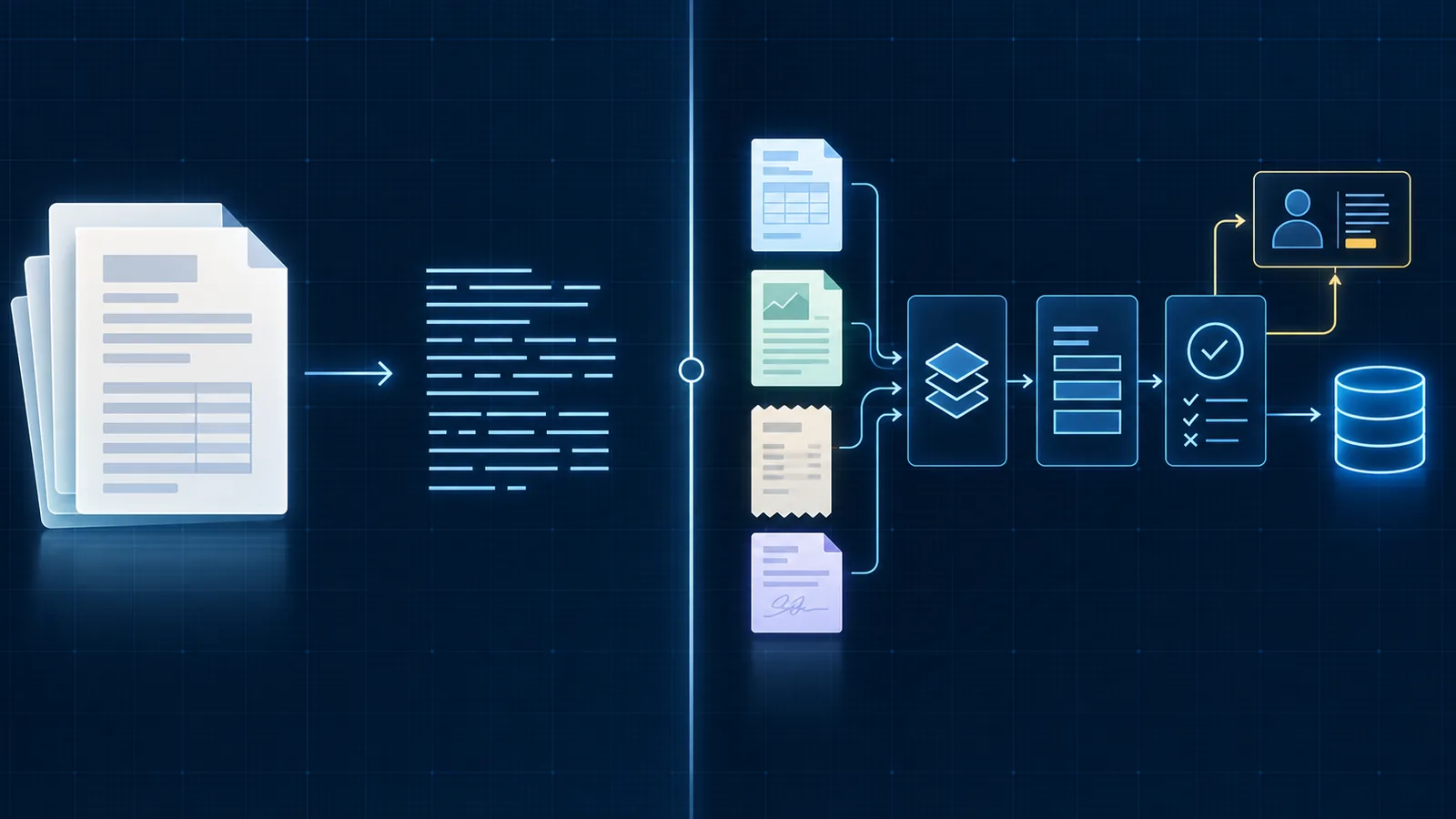
OCR captures text; intelligent document processing operates on it
Optical character recognition, or OCR, detects characters and often their location on a page. It can turn a scan into searchable text, recover text from an image and preserve basic layout information. That is valuable, but it does not necessarily identify the business meaning of what was read.
Intelligent document processing, commonly shortened to IDP, uses OCR as one input to a wider system. It may split a document package, classify each document, extract named fields, normalize their formats, apply business rules, route uncertainty to a person and send an accepted result to another system.
OCR output
Characters, words, lines, tables and coordinates that software can inspect.
IDP output
A classified, structured and validated business object ready for review or controlled use.
OCR success
The page became accurately machine-readable.
IDP success
The correct business outcome completed with traceable evidence and managed exceptions.
Use OCR alone when machine-readable text is the actual requirement
OCR can be the right tool for digitizing archives, making PDFs searchable, indexing document collections or extracting text that a person will still interpret. In those cases, the system is not pretending to understand the business decision behind every value.
A consistent form may also support deterministic extraction based on known regions or labels. If a limited set of templates produces stable results and the downstream action remains supervised, adding a more complex model may not create enough value to justify its operating burden.
Search and archive
Make scanned material discoverable without automatically acting on its contents.
Human-led interpretation
Prepare readable text while a person remains responsible for meaning and action.
Stable templates
Use dependable layout or label rules when documents change very little.
Reversible use
Keep the extracted text in a draft or staging state that can be corrected safely.
Add intelligent processing when documents drive a recurring business workflow
A production workflow needs to know more than the page text. It must decide which schema applies, whether the required values are present, whether they agree with approved records and who may accept the result. The document processing workflow pillar shows how those stages connect.
IDP becomes useful when documents arrive in variable layouts, contain tables or key-value relationships, mix several document types or need to create a consistent record in a CRM, accounting platform or case-management system. The intelligence belongs in the combination of models, rules, evidence and operating controls—not in a single extraction call.
Classification
Identify the document type and select the approved schema and processing path.
Structured extraction
Map different labels and layouts into consistent business fields.
Validation
Test completeness, formats, cross-field relationships and available source records.
Workflow action
Route, review or update only after the result passes its acceptance gate.
Do not confuse model confidence with business correctness
A model may be highly confident that it read a value correctly even when the document contains the wrong account number. It may also assign lower confidence to a correct value on a poor scan. Confidence is useful for triage, but the threshold must reflect the field’s consequence and the other evidence available.
Validate critical fields with deterministic rules and business records. In the document data validation lab, a 99% confidence input can still fail arithmetic or supplier checks. Change a rule and compare the outcomes across the labelled synthetic cases.
Field consequence
Apply stronger evidence to values that affect money, contracts, customers or access.
Rule result
Use pass, fail and unavailable states rather than forcing uncertainty into a binary answer.
Source comparison
Check the proposed value against the document and approved business records.
Human review
Ask a person to decide only when judgment, authority or unresolved evidence requires it.
Select the method with a representative document test
Create a test set from actual operating documents. Include common formats, new suppliers, low-quality scans, handwritten additions, multi-page files, missing values, duplicates and documents that should be rejected. Mark the expected classification, critical fields and correct disposition before testing a tool.
Compare approaches at the level of the business result. A model with better average extraction may still create more review work if it cannot explain source locations or if its errors occur in critical fields. Measure correction time and exception quality alongside field accuracy.
Baseline
Record current handling time, correction work, backlog and common error categories.
Critical-field accuracy
Score the values that determine the downstream action separately.
Review effort
Measure how long people need to verify and correct routed items.
Operational fit
Test access, traceability, latency, cost and recovery—not only extraction quality.
Build only as much document intelligence as the workflow needs
Start with the simplest method that meets the acceptance criteria on representative evidence. A dependable workflow can combine direct digital data, OCR, document models, deterministic rules and human review; it does not need to force every document through the same technique.
OpSmith designs document processing automation around the operating outcome, including validation, exception handling and the final system update—not just text extraction.
Frequently asked questions
What is the main difference between OCR and intelligent document processing?
OCR converts visible text into machine-readable text. Intelligent document processing combines text and layout extraction with classification, field mapping, normalization, validation, human review and downstream workflow actions.
Does intelligent document processing replace OCR?
No. OCR is often one component inside intelligent document processing. The wider system uses OCR output together with document structure, models, rules and business context.
When is OCR alone enough?
OCR may be enough when the goal is to make a document searchable, archive its text or feed a later manual process. It is usually insufficient when extracted values will update operational records or trigger consequential actions.
Can OCR confidence determine whether a document is correct?
No. Confidence can help route uncertain fields, but it does not prove that a plausible value is complete, current or valid for the business. Critical values also need deterministic checks and source evidence.
Do all documents require a custom AI model?
No. Stable documents may work with layout rules or prebuilt extractors. Variable or unstructured documents may need a custom model, but the choice should follow representative testing rather than novelty.
Sources and further guidance
These official references provide relevant technical, privacy, risk-management or accountability guidance. OpSmith applies the useful principles to the operation of one business workflow.
- Enterprise Document OCRGoogle Cloud
- Document AI overviewGoogle Cloud
- Document Intelligence overviewMicrosoft Learn