
- Create one controlled intake path and preserve the original invoice before extracting or changing any accounting record.
- Validate critical fields and match the invoice to available vendor, purchase-order and receiving evidence before approval.
- Separate PO, non-PO and exception paths; show reviewers the failed rule and source evidence instead of asking them to reprocess the invoice manually.
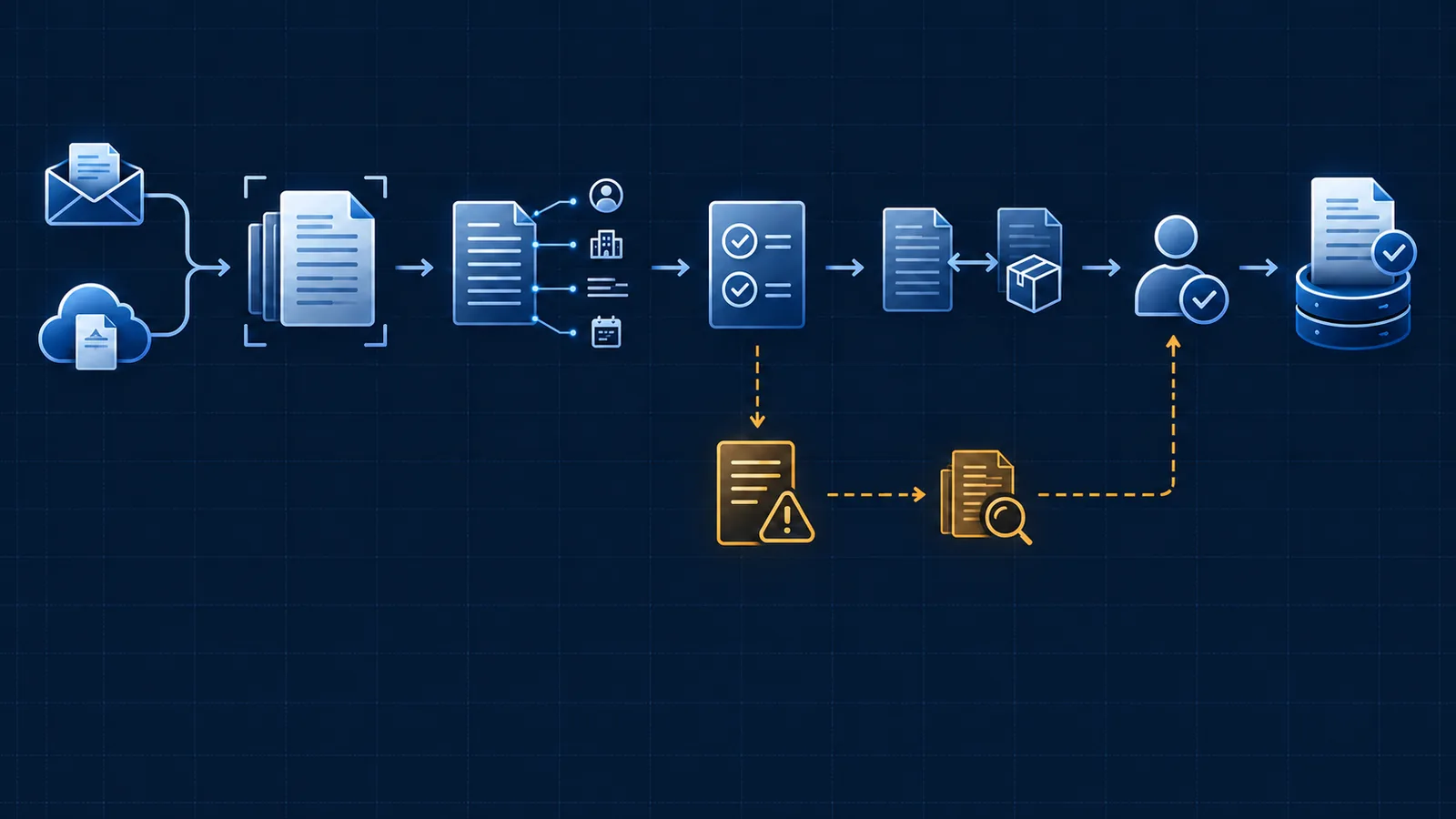
Define where invoice processing starts and ends
The workflow should start at an observable receipt event and end only when an accepted accounting record exists—or when the invoice has been rejected or returned with a recorded reason. ‘Read the invoice’ is not a complete process boundary because it omits the financial decision and the destination state.
Map the people and systems that participate today: accounts payable, purchasing, receiving, project or department owners, email inboxes, vendor records, purchase orders and the accounting platform. This reveals where waiting, duplicate entry and informal approvals actually occur.
Start
An invoice enters through an approved email address, upload, scan or supplier channel.
Success
A validated and authorized record is created in the intended accounting state.
Alternative end
A rejected, disputed or duplicate invoice is closed with evidence and ownership.
Process owner
A named role owns policy, approval design, exceptions and performance.
Capture the source and check for duplicates first
Preserve the original attachment and its receipt context before processing. Record the sender, received time, file identifier and any message or case information needed to explain where the invoice came from. Do not rely on a renamed file as the only source trace.
Duplicate detection belongs near the beginning and again before the final write. Vendor names and invoice numbers vary in formatting, so use a combination of normalized identifiers, amount, date, purchase order and file evidence. A suspected duplicate should enter a review state, not disappear silently.
Original source
Keep the received invoice unchanged and addressable throughout the workflow.
Vendor identity
Resolve the supplier against an approved vendor record rather than free text alone.
Composite match
Compare several stable invoice attributes and the destination system before posting.
Contained review
Hold possible duplicates with the matching record and an explicit decision path.
Extract invoice fields and validate the critical ones
Useful fields commonly include vendor, invoice number, invoice date, currency, subtotal, taxes, total, purchase-order reference, payment terms and line items. The exact schema should be determined by the accounting action and reporting needs—not by every value a model can find.
Validate required fields, recalculate totals, check formats and compare the proposal to approved records. Try the invoice examples in the document data validation lab: a confident but incorrect total, a duplicate invoice and an unavailable ledger need different responses.
Required fields
Stop when a value needed for posting, matching or approval is missing.
Arithmetic
Compare line extensions, subtotal, tax and total within an approved tolerance.
Entity match
Confirm the vendor, purchase order and related project or cost object exist.
Source trace
Keep the page and region behind each consequential extracted value.
Route PO, non-PO and mismatch cases deliberately
A purchase-order invoice can be compared with the order and, when the process provides it, receiving evidence. The purpose is not to force every difference through the same path. Define tolerances for quantities, prices, freight, tax and partial delivery according to the organization’s policy and authority levels.
A non-PO invoice needs a separate route to the responsible cost owner and coding context. An invoice with an unknown vendor, closed purchase order or disputed quantity is an exception that needs more evidence or authority before it can continue.
Matched PO
Compare supplier, items, quantity, price and available receipt evidence.
Permitted variance
Apply documented tolerances without hiding the difference from the audit record.
Non-PO invoice
Request coding and approval from the accountable business owner.
Mismatch
Route the invoice with the conflicting values and the person responsible for resolution.
Make approval a clear decision rather than another inbox
The reviewer should see the original invoice, proposed accounting fields, match result, previous approvals and the reason their decision is required. Present approved actions such as accept, correct, reject, request information or escalate. Preserve both the automated proposal and the final human decision.
System outages, missing evidence and unresolved mismatches need a safe holding state and retry rule. Start with the invoice example in the exception recovery runbook builder to plan destination checks, accounts-payable ownership and escalation when a posting attempt returns no confirmation.
Authority
Route according to amount, cost ownership, policy and the type of exception.
Decision context
Show the source, proposed record, validations and exact reason for review together.
Service recovery
Retry only from a known safe state after checking whether the prior write succeeded.
Escalation
Set an owner and age threshold for invoices that cannot be resolved on the normal path.
Verify the accounting entry and measure the whole outcome
Posting is not successful merely because an integration request returned without an error. Confirm that the intended record exists, carries the expected status and links back to the invoice and approval evidence. Record the destination identifier so recovery does not create a second entry.
Measure elapsed processing time, touch time, critical-field correction rate, duplicate rate, mismatch categories, approval age and successful posting. A lower manual handling time is valuable only when the final record is dependable and exception work remains visible.
Verified write
Read or reconcile the destination state after a material update.
Cycle time
Measure receipt through acceptance, including time waiting for information or approval.
Correction rate
Track material changes to proposed critical fields by document source and layout.
Exception recurrence
Use repeated failure categories to improve the rule, input or upstream process.
Automate one invoice path before expanding the scope
Start with a representative supplier group, one accounting destination and explicit PO, non-PO and exception rules. Test ordinary invoices and the cases that create the most correction work. Expand only when the operating evidence shows that the first path is reliable.
A broader document processing automation engagement can connect invoice extraction to existing approval, purchasing and accounting systems while preserving the controls your team needs.
Frequently asked questions
What are the main steps in an invoice processing workflow?
The common stages are controlled receipt, duplicate detection, document and vendor identification, field extraction, validation, purchase-order or receiving match when applicable, approval, exception resolution and a verified accounting-system entry.
Can invoices be processed without purchase orders?
Yes, but non-PO invoices need a different evidence and approval path. The workflow should identify the responsible cost owner, permitted coding, approval authority and supporting documentation instead of pretending a purchase-order match exists.
Should every invoice require human approval?
That depends on company policy and consequence. Automation can prepare and validate the invoice while an authorized person approves the commitment. Some organizations may allow approved low-risk cases to proceed under defined controls.
How should duplicate invoices be detected?
Use several signals together, such as vendor identity, normalized invoice number, amount, date, purchase order and file fingerprint. A possible duplicate should be contained for review rather than automatically deleted.
What should happen when invoice data is uncertain?
Preserve the original invoice, identify the uncertain field or failed rule, prevent premature posting and route the item with enough context for an authorized person to correct, reject or request clarification.
Sources and further guidance
These official references provide relevant technical, privacy, risk-management or accountability guidance. OpSmith applies the useful principles to the operation of one business workflow.
- Analyzing invoices and receiptsAmazon Textract documentation
- Document Intelligence prebuilt invoice model overviewMicrosoft Learn