
- INSP-801 is complete, but only one of its three findings is closed at the reporting cutoff. One repair needs verification and one location needs clarification.
- Match property, location, asset, finding and work order before creating new work or changing an existing record.
- Use the completed finding register and blank template to define review, assignment, closure and owner-reporting handoffs.
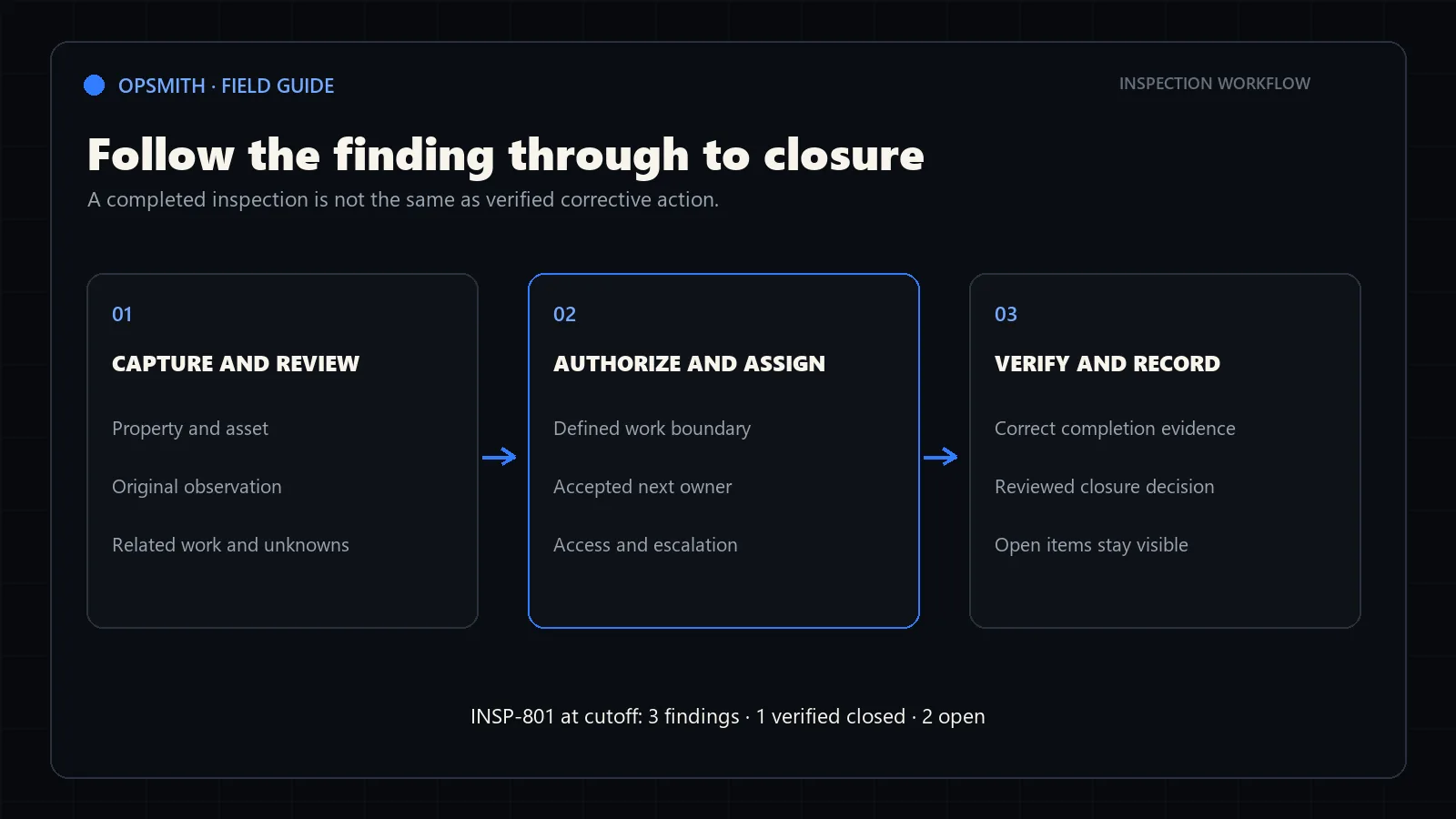
Define inspection completion and corrective-action completion separately
An inspection can finish when the inspector has completed the agreed observation and report. That does not establish that every finding has been assessed, authorized for repair or resolved. Store the inspection status separately from each finding's next action and the status of any linked work order.
This guide describes administrative workflow design. The responsible property manager and qualified parties determine required inspections, access, escalation, repair methods and verification. An AI interpretation of a photograph is not a safety assessment, permission to enter a unit or authority to charge a tenant.
OpSmith's property management automation work can connect these administrative handoffs around existing systems. Begin with the property identifiers, approved inspection process and the point where the organization accepts a finding or releases work.
Prepare the inspection type, access and capture checklist
Start by identifying the inspection's purpose: move-in condition, move-out comparison, a routine unit visit, common-area review or follow-up on earlier findings. These need different scope and evidence. This guide focuses on property-management observation and administrative follow-through; it is not a purchase inspection or a substitute for a specialist assessment.
The manager sets the schedule, authorized areas, inspector, applicable access arrangements and escalation route. Use the actual property procedure and applicable requirements rather than adopting a universal inspection frequency or entry-notice rule from a template. Give the inspector the current location list and unresolved findings before the visit.
| Check | Record | Why it matters |
|---|---|---|
| Purpose and coverage | Inspection type, property, units/common areas, exclusions and approved checklist | Shows what was actually inspected |
| Access and responsibility | Assigned inspector, approved arrangements and contact for unresolved access | Keeps a scheduled visit separate from permitted access |
| Observation identity | Finding ID, location/asset, observed time and source photo or note | Lets the manager match the same condition later |
| Earlier work | Existing finding and work-order references | Avoids duplicate work while retaining new evidence |
| Review route | Manager, required response route, next action and review date | Makes each unresolved observation actionable |
| Completion evidence | Who verifies, what evidence is required and where it will be stored | Defines closure before a contractor reports completion |
Worked example: three findings and only one verified closure
INSP-801 is a fictional common-area inspection at NORTH-04, completed on October 29, 2026. Finding F-801A describes a stairwell door reported not to close as expected. The manager routes it under the property's approved escalation process and authorizes WO-801. A contractor accepts the task and later reports completion, but the attached image shows a different door. Closure verification remains pending.
F-801B concerns corridor light L-02, already covered by WO-780. A second upload is another copy of the same photograph, so it is linked to the existing finding and work order. A designated reviewer verifies that action on October 30. F-801C records a ceiling-panel observation whose location is ambiguous. The manager owns the clarification; the example does not invent an asset or dispatch a contractor to a guessed location.
At the end-of-day October 31 reporting cutoff, the inspection is complete and its three findings have three different dispositions: one verified closed, one awaiting verification and one awaiting location clarification. These are worked records, not a customer project or a measured automation result. All example timestamps use explicit UTC offsets in the downloadable packet.
| Finding | Linked action | Evidence at cutoff | Owned next step |
|---|---|---|---|
| F-801A: stairwell door | WO-801; vendor accepted | Completion reported; photo identifies a different door | Property manager obtains correct evidence or arranges the approved verification |
| F-801B: corridor light L-02 | Existing WO-780 | Designated reviewer verified closure October 30 | Retain closure evidence; do not create duplicate work |
| F-801C: ceiling-panel observation | No work order released | Location cannot be resolved from the source | Inspector clarifies location for the manager |
Download the worked records and templates
The fictional NORTH-04 property connects the inspection and owner-reporting examples. There are no client records, real photographs, production results or repair instructions in these files.
Keep enough identity and evidence to support the next decision
Give each inspection and finding a stable identifier. Preserve the property, unit or common-area location, asset reference where available, observed time, received time, inspector and source references. A late upload should not change when the condition was observed, and a revised note should not erase the earlier account.
Keep the original observation distinct from its interpretation, the proposed action and the approval decision. Record who owns the next action, the due or review time under the actual process, any linked work order, permitted scope and the evidence required for closure. Unknown is a usable state when it creates a specific clarification task.
A repeated upload, a second report of the same condition and a changed condition need different handling. Reuse the finding or work reference where appropriate, but preserve new evidence. Never suppress a fresh escalation indicator merely because the asset already has an open task.
Review the finding before releasing the work
The manager confirms the location, applicable priority route, work boundary and authorized spend or decision owner. Access arrangements and vendor availability remain separate fields. A finding that justifies review does not automatically authorize a repair, and a notification sent to a contractor does not prove accepted responsibility or a confirmed appointment.
For WO-801, preserve the specific door reference, the reviewed observation and the contractor's acceptance. If evidence is insufficient to identify the door, the next action is clarification or an approved inspection step, rather than an inferred location. Follow the property's actual escalation procedure for urgent indicators while resolving record quality.
The maintenance request triage workflow covers related tenant reports and dispatch readiness. An inspection finding can enter the same coordination process, but it retains its inspection source and its own evidence of authorization and completion.
- CapturePreserve the inspection, finding, location and source evidence.
- ReviewResolve identity and route the observation under approved rules.
- AuthorizeRecord permitted work, responsible role and access dependencies.
- AssignObtain accepted ownership and track stalled handoffs.
- VerifyCheck completion evidence against the actual finding before closure.
Verify the same finding and retain the reason for reopening
Choose the closure evidence appropriate to the work with the responsible owner. A supplier's completion message is one source. The organization may require a reviewed image of the correct asset, an inspection result or another authorized confirmation. Define the requirement before an automated status change is allowed.
WO-801 remains awaiting verification because the available image does not support the reported location. The workflow can request the missing evidence and show its age and owner. It should not mark the repair failed solely because an attachment is wrong, and it should not mark it verified because a contractor selected complete.
If a later observation changes the condition, link it to the existing history and record a new review or reopening decision. Do not silently overwrite the closure record or pretend the finding never closed. Preserve who made each decision, when it was effective and which source supported it.
A separate property work-order invoice matching check compares authorized work, completion evidence and billing. Verifying a corrective action does not itself approve an invoice, allocate a tenant charge or authorize payment.
Use existing inspection capabilities before adding another system
Buildium's maintenance and inspection feature documentation describes HappyCo capture linked to maintenance records. Check your existing account before adding another inspection app. The useful custom work may be matching findings, routing exceptions or verifying the handoff between tools.
Keep the record contract clear even when several tools are involved: which system owns the finding, which owns the work order and where the verified decision is stored. If a destination acknowledgement is lost, reconcile the record before repeating a create action. A duplicate-prevention check needs durable identity and an appropriate write boundary.
AI can prepare source-linked observations, organize permitted photos and suggest missing fields for review. It should not diagnose hazards, infer facts hidden from a photograph or decide repair sufficiency. Evaluate drafts against reviewed examples of wrong locations, duplicate media, new conditions and unsupported completion statements.
Collect only information needed for the approved purpose and control who can view images and notes. Avoid copying unrelated resident information into the finding or owner packet. Canada's privacy regulator's principles provide a starting point for purpose, limited collection and safeguards; the responsible organization confirms the requirements that apply to its circumstances.
Use one register row per finding and a named next action
Open the completed finding register beside the blank template. Create a row for each finding, not each photograph, and keep repeated media linked to that row. Fill the property/location and source references first, then add the reviewed disposition, linked work order, responsible owner and next verification step.
For F-801A, the useful next action is to obtain evidence of the correct door or arrange the approved verification. F-801B retains its existing work order and verified closure. F-801C needs location clarification before work is released. These three different actions show why a single complete checkbox is insufficient.
Review findings waiting on clarification, unaccepted assignments and completion evidence under the property's chosen review schedule. If a deadline passes, escalate the specific unresolved action to its owner. A report of a potentially urgent condition follows the approved escalation route immediately; it should not wait for the register's routine review.
Pilot one inspection type and carry open work into reporting
Begin with one property and a defined inspection type. Have the responsible reviewers set expected decisions before testing. Include missing location, repeated upload, a genuinely changed condition, unaccepted assignment, a wrong completion photo and an uncertain destination write. The downloadable acceptance cases state expected behaviour; their actual results are unrun.
Measure inspection-report preparation separately from the age of unreviewed findings, accepted assignments, evidence awaiting verification and reopened actions. Count eligible findings as well as work orders: one finding may reuse an existing work order, and another may not yet justify creating one.
The property owner reporting workflow carries these exact NORTH-04 statuses into a dated owner packet. At the October 31 cutoff, it reports one of three inspection findings verified closed and two still open; it does not call the property issue-free because the inspection report is complete.
Frequently asked questions
Does completing an inspection close its findings?
No. Inspection completion records the agreed observation and report. Each finding needs its own disposition, responsible role and required evidence before corrective-action closure is recorded.
Should every inspection finding create a new work order?
No. A finding may link to existing work, need clarification, require a different approved review or justify a new authorized task. Match its location and evidence before creating another record.
Can AI decide that a repair is safe or complete?
AI can help organize evidence and flag missing or conflicting fields. The responsible manager and qualified parties define and verify the required outcome. A generated description or image interpretation is not a safety decision or independent completion evidence.
What happens when a contractor's completion photo shows the wrong asset?
Keep the completion report and the mismatch visible. Request the correct evidence or use the approved verification route. Do not declare verified closure or invent a repair failure from the wrong photograph alone.
What should the owner report show while a finding remains open?
Show the cutoff date, current disposition, relevant exception and accountable next action. Keep later updates in the appropriate new period or an explicitly reviewed correction version instead of silently changing the issued snapshot.
Sources and further guidance
These official references provide relevant technical, privacy, risk-management or accountability guidance. OpSmith applies the useful principles to the operation of one business workflow.
- Inspection capture, maintenance tasks and work ordersBuildium
- Fair information principlesOffice of the Privacy Commissioner of Canada