
- Choose the connection by the outcome: individual email logging, team conversation handling, or reviewed updates to CRM properties. A Microsoft 365 shared mailbox is not supported as an individual connected inbox.
- The worked custom design proposes REQ-501 and review_pending for an existing contact's two approved custom fields. A coordinator owns review and the next action.
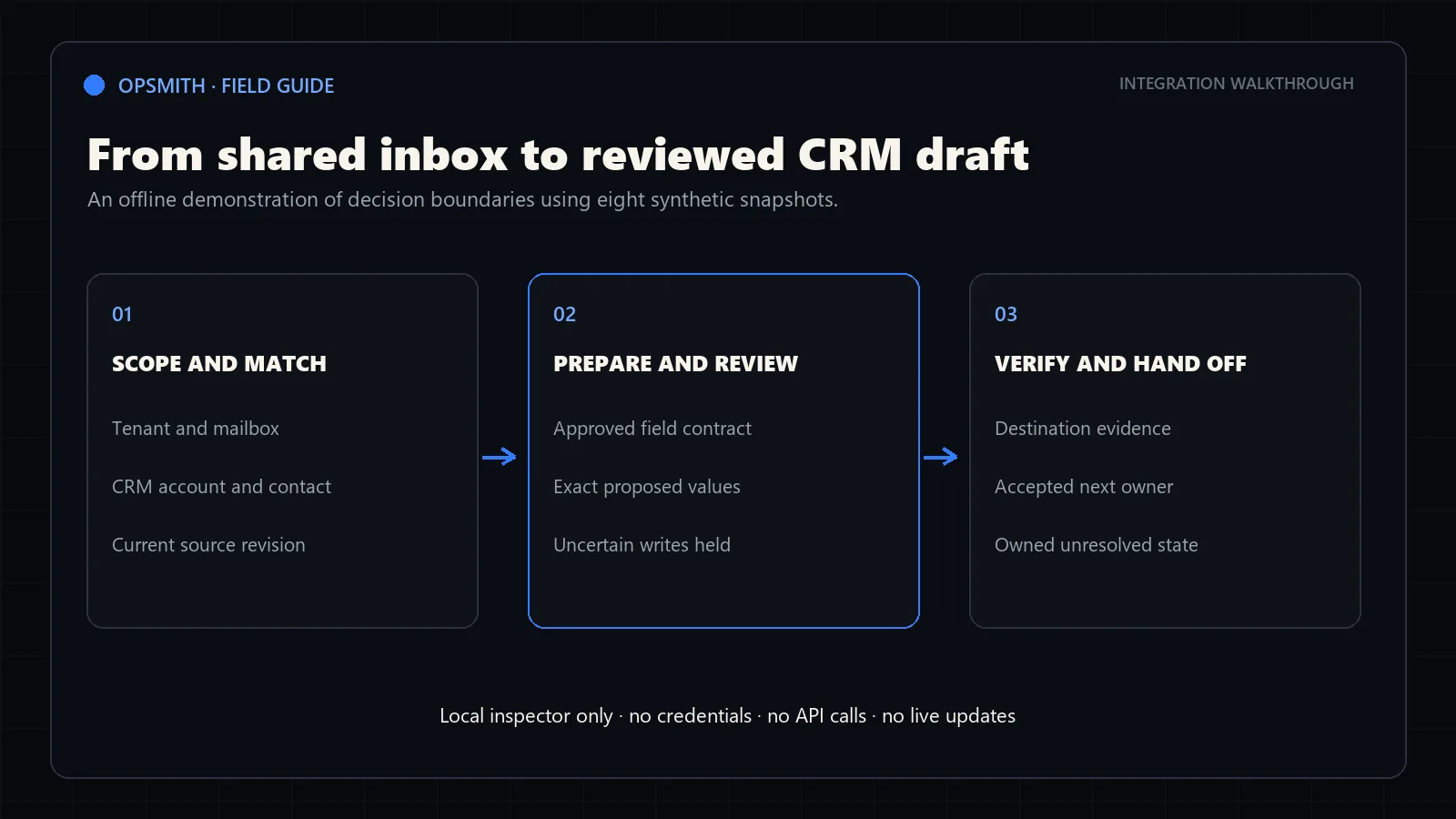
- Eight synthetic cases and a read-only local inspector demonstrate the decision rules. No live Microsoft or HubSpot connection, write or production recovery test is claimed.
Choose native email connection, team inbox or custom workflow first
For your own work address, HubSpot's individual email connection instructions cover email logging and one-to-one CRM email tools. Microsoft 365 shared mailboxes are excluded from that individual connection. An Outlook client, a personal Microsoft 365 inbox and a shared mailbox are different resources.
If a team simply needs shared conversations in HubSpot, review its hosted inbox forwarding instructions. HubSpot documents forwarding for Microsoft 365 shared mailboxes. Start in the conversations inbox settings, connect a Team email channel using Other mail account, create the hosted destination, and have the mailbox administrator configure approved forwarding. Verify receipt and routing with an approved test message before relying on it.
Forwarding conversations does not establish that arbitrary CRM fields will be updated under your approval rules. The custom path below is useful when a request must map to a known contact, prepare specific property changes, stop for review and transfer an owned task. It is a design walkthrough and local demonstration; follow the linked native instructions when they already satisfy your need.
| Need | First route to assess | Check before connecting |
|---|---|---|
| Individual email logging and one-to-one sales email | Native individual work-email connection | Supported mailbox type, personal email permission and seat |
| Shared team conversations | HubSpot team inbox; hosted forwarding for Microsoft 365 shared mailboxes | Forwarding permission, delivery, routing and required account features |
| Reviewed custom CRM field updates and operational handoff | Connector-based or API-based workflow | Mailbox access, existing-contact identity, property scope and recovery |
Prepare access, field ownership and a test record
Name the Microsoft administrator, HubSpot administrator, business reviewer and ongoing maintainer. Agree which mailbox and folder can be read, which HubSpot account and existing contact can be used, and who may approve the two proposed property changes. Start with a test contact and approved sample messages rather than an unrestricted production mailbox.
Have the administrators confirm a supported Microsoft access method, the required CRM read/write scopes, the custom text-property schema, and any plan or connector rights. The local demonstration needs only Node.js and its three files; a connected pilot needs these separate account and consent prerequisites resolved.
Define success before connecting: one current source request produces one reviewed proposal; an approved update is verified on the intended contact; the coordinator accepts the next action. Track human corrections and unresolved cases as well as completed updates. This gives the pilot a business outcome beyond a green run indicator.
Define the exact source, destination and permitted change
The fictional operations inbox receives a request already mapped through an approved account-specific reference to HubSpot contact 101. The proposed update is limited to two administrator-defined custom text properties: opsmith_request_reference and opsmith_request_status. These names are examples, not built-in HubSpot fields. An administrator must approve and configure their schema before any live mapping is possible.
The base snapshot belongs to tenant TENANT-DEMO, mailbox MAILBOX-DEMO and CRM account ACCOUNT-DEMO. It proposes REQ-501 and review_pending for contact 101. Contact creation, merging, lifecycle-stage changes, marketing consent, email sending and financial fields are outside this example. A sender address alone does not authorize those operations or establish a unique customer identity.
The shared-inbox lead capture guide covers the broader identity and opportunity workflow. This walkthrough adds an explicit field contract, current API boundaries and an inspectable local decision example for CRM data entry automation.
| Element | Example | Required evidence |
|---|---|---|
| Source | TENANT-DEMO / MAILBOX-DEMO / MSG-501, revision 1 | Approved resource scope and retained source reference |
| Destination | ACCOUNT-DEMO / contact 101 | Account-specific verified mapping and current record read |
| Custom properties | opsmith_request_reference; opsmith_request_status | Approved schema and allowed values |
| Proposed values | REQ-501; review_pending | Current source revision and reviewer approval before any write |
| Next owner | Operations coordinator | Accepted responsibility after destination verification |
Download the local integration example
Use these synthetic records to inspect the decisions locally. The script reads files without connecting to Outlook or HubSpot.
Choose the Microsoft access pattern before building the trigger
Microsoft's shared-mail access documentation describes delegated Mail.Read.Shared or Mail.ReadWrite.Shared alongside the user's existing mailbox delegation. Those delegated shared scopes do not support change-notification subscriptions on shared folders. An application-permission notification design is a different administrative arrangement; choose the supported pattern with the tenant administrator.
Agree the permitted mailbox and folder, read-only intake requirements, authentication model, consent and resource restrictions with the tenant administrator. Confirm the exact endpoint supports the selected permissions. The local example assumes approved intake evidence is already available; it does not establish a functioning shared-mailbox polling or subscription configuration.
For message identity, Microsoft Graph offers the opt-in Prefer: IdType="ImmutableId" header. Its documented stability has mailbox boundaries; it is not a universal business deduplication key. Keep tenant and mailbox context and preserve case. The fixture's MSG-501 is an opaque placeholder, not an actual Graph response. A forwarded copy or a changed request still needs a business-level decision.
Use account-specific contact identity and a versioned API contract
Resolve the intended CRM account and the previously approved contact mapping before drafting changes. Unknown, ambiguous, archived or unavailable records need separate handling. A failed lookup is not proof that a contact does not exist, and an email match is not permission to merge records. The demonstration only accepts an already verified mapping to an existing contact.
HubSpot's current object API documentation describes reading and updating records by object and record ID. The documentation checked on November 4, 2026 uses the 2026-09 API family. Pin and test the API version actually selected for the implementation rather than combining a legacy connector recipe with a current endpoint by assumption.
Check the destination property names, types, allowed values, scopes and current values. HubSpot's search documentation notes delayed visibility after changes. A missing search result after a possible update does not establish that the update failed. Preserve the known account and contact ID, and reconcile using appropriate current-record evidence before deciding whether a retry is permitted.
A read followed by a write can race with another writer. This guide does not assert that a standard contact update provides an atomic compare-and-swap or a universal idempotency key. Establish serialization, field ownership and reconciliation appropriate to the chosen API and concurrent business activity before enabling writes.
| Operation | Current API shape | Boundary |
|---|---|---|
| Read known contact | GET /crm/objects/2026-09/0-1/101 | Request the agreed properties; verify account and current record |
| Propose update | PATCH /crm/objects/2026-09/0-1/101 | Only after approval; properties contain the two agreed custom text fields |
Proposed property body
After an administrator configures the two custom text properties, a reviewed proposal could contain the following body. This is illustrative JSON; it has not been sent to HubSpot.
{
  "properties": {
    "opsmith_request_reference": "REQ-501",
    "opsmith_request_status": "review_pending"
  }
}
Run eight local snapshots and inspect the decisions
Download the JSON snapshots, expected-decisions CSV and inspector into the same folder. With Node.js installed, run node inspect-outlook-hubspot.mjs from that folder. The script uses only local file reads and deterministic comparisons, prints one result per case and exits with a failure if a result differs from the independent expected register. No credentials, packages or network connection are used by the script.
All eight reference cases passed the published inspector during preparation on November 4, 2026. That establishes agreement with this small expected-decision set. It does not measure extraction accuracy, prove API compatibility or demonstrate durable duplicate prevention under concurrent cloud delivery. Inputs are independent recorded states, not a simulated live message stream.
Run the inspector
node inspect-outlook-hubspot.mjsA successful run ends with 8/8 local cases passed. No live API tests performed. The first case returns prepare_draft, the uncertain-write case returns reconcile_before_retry, and the verified record awaiting its owner returns handoff_pending.
| Case | Recorded condition | Expected decision |
|---|---|---|
| INT-01 | Scoped existing contact, current revision, no prior action | prepare_draft |
| INT-02 | Same current event already recorded | existing_event |
| INT-03 | Identity mapping ambiguous | review_identity |
| INT-04 | CRM lookup unavailable | hold_unknown |
| INT-05 | Update may have succeeded; destination unverified | reconcile_before_retry |
| INT-06 | Destination matches, next owner has not accepted | handoff_pending |
| INT-07 | Destination belongs to a different account | hold_scope |
| INT-08 | Source revision changed since review | re_review_version |
Separate draft preparation, permitted write and verified handoff
In production, retain the source revision, reviewer decision, proposed field set and durable action identity before attempting a write. The action identity belongs to your integration ledger; it is not an assertion that either API recognizes an arbitrary idempotency key. A repeated current event should recover its existing state, while a genuine source revision requires a new review decision.
Record an attempted write and its uncertainty even if the request times out. Read and compare the intended destination fields before retrying. A confirmed matching record allows the handoff to proceed; a mismatch or unavailable read stays owned and unresolved. Restrict the record evidence to the minimum needed for the task and keep secrets out of event logs.
Destination verification and accepted operational ownership are separate. INT-06 already has matching destination evidence but is still waiting for the next owner. The inspector therefore returns handoff_pending. It does not send a notification or create a task. A production task creation path needs its own durable identity and reconciliation.
- ScopeVerify tenant, mailbox, account and existing contact.
- PreparePropose only the agreed fields from the current source revision.
- ReviewBind approval to that exact revision and field set.
- ReconcileVerify uncertain writes before retrying.
- Hand offConfirm the destination and accepted next owner.
Use the local demonstration to prepare a real acceptance plan
Before a live pilot, verify authentication renewal and revocation, mailbox restrictions, API-version compatibility, property permissions, rate limits, concurrent delivery, persistent recovery state, logging and retention. Add cases for missing properties, removed contacts, changed mappings, unavailable owners and competing edits. Define a disable and recovery procedure that reconciles partially completed work.
The platform comparison guide helps select the orchestration environment. Pair its trial with source-to-destination reconciliation and the regression testing checklist. OpSmith can scope a connected pilot through an Operational AI Blueprint; this public example is a design and local demonstration, with live integration tests unrun.
Troubleshoot the failing boundary instead of rerunning everything
Inspect the actual API response and the account's current configuration. The following are diagnostic checks, not guarantees about the cause of a particular error. Keep the source request and attempted action available to the responsible administrator without putting tokens or unnecessary message content in logs.
| Symptom | Check next | Keep the workflow from doing |
|---|---|---|
| Shared mailbox will not connect as an individual inbox | Use the supported team-inbox forwarding path or an approved custom access pattern | Repeatedly attempting an unsupported mailbox type |
| Permission denied reading the message | Mailbox delegation, token permissions, consent and actual resource scope | Treating inaccessible mail as an empty inbox |
| Contact lookup is missing or unavailable | Intended account, contact ID, access and current-record evidence | Creating a replacement contact from an uncertain lookup |
| Property update is rejected | Internal property name, type, allowed value and write scope | Changing unrelated fields to make the request pass |
| Update times out or contact search looks stale | Known record and intended values; search visibility can lag | Retrying a possibly completed write blindly |
| The same message produces repeated work | Mailbox-scoped source identity, source revision and durable action record | Assuming a local snapshot check proves concurrent duplicate prevention |
Frequently asked questions
Can I connect a Microsoft 365 shared mailbox as an individual HubSpot inbox?
HubSpot excludes Microsoft 365 shared mailboxes from individual connected email. Assess its supported hosted-inbox forwarding route for team conversations, or an approved custom workflow for reviewed property updates.
Can Mail.Read.Shared subscribe to shared-mailbox change notifications?
Microsoft documents that delegated shared-mail scopes do not support those change-notification subscriptions. Choose and verify a supported access pattern with the tenant administrator before building the trigger.
Does the example create a HubSpot contact from each sender?
No. It requires an approved account-specific mapping to an existing contact. Ambiguous identity and unavailable lookup evidence produce review or hold decisions rather than contact creation.
What do the eight passing local cases prove?
They show that the published deterministic inspector matches the expected decisions for eight independent synthetic snapshots. They do not prove live API access, production recovery, concurrent idempotency or extraction accuracy.
Should a timed-out CRM update be retried immediately?
First reconcile the intended destination record. The update may have succeeded even if its acknowledgement was lost. Keep unknown evidence separate from a confirmed missing update and record the next permitted action.
Sources and further guidance
These official references provide relevant technical, privacy, risk-management or accountability guidance. OpSmith applies the useful principles to the operation of one business workflow.
- Individual email connection and unsupported shared mailboxesHubSpot
- Hosted inbox forwarding for shared mailboxesHubSpot
- Shared and delegated Outlook messages and foldersMicrosoft Graph
- Immutable identifiers and their boundariesMicrosoft Graph
- Using the current CRM object APIsHubSpot
- CRM search and delayed visibilityHubSpot