
- Choose one recurring handoff with a project identifier, source evidence, accountable owner and observable output.
- Automate collection, preparation and reminders while keeping scope, financial and compliance decisions with the authorized role.
- Test late uploads, duplicate submissions, changed drawings and missing context before expanding across projects.
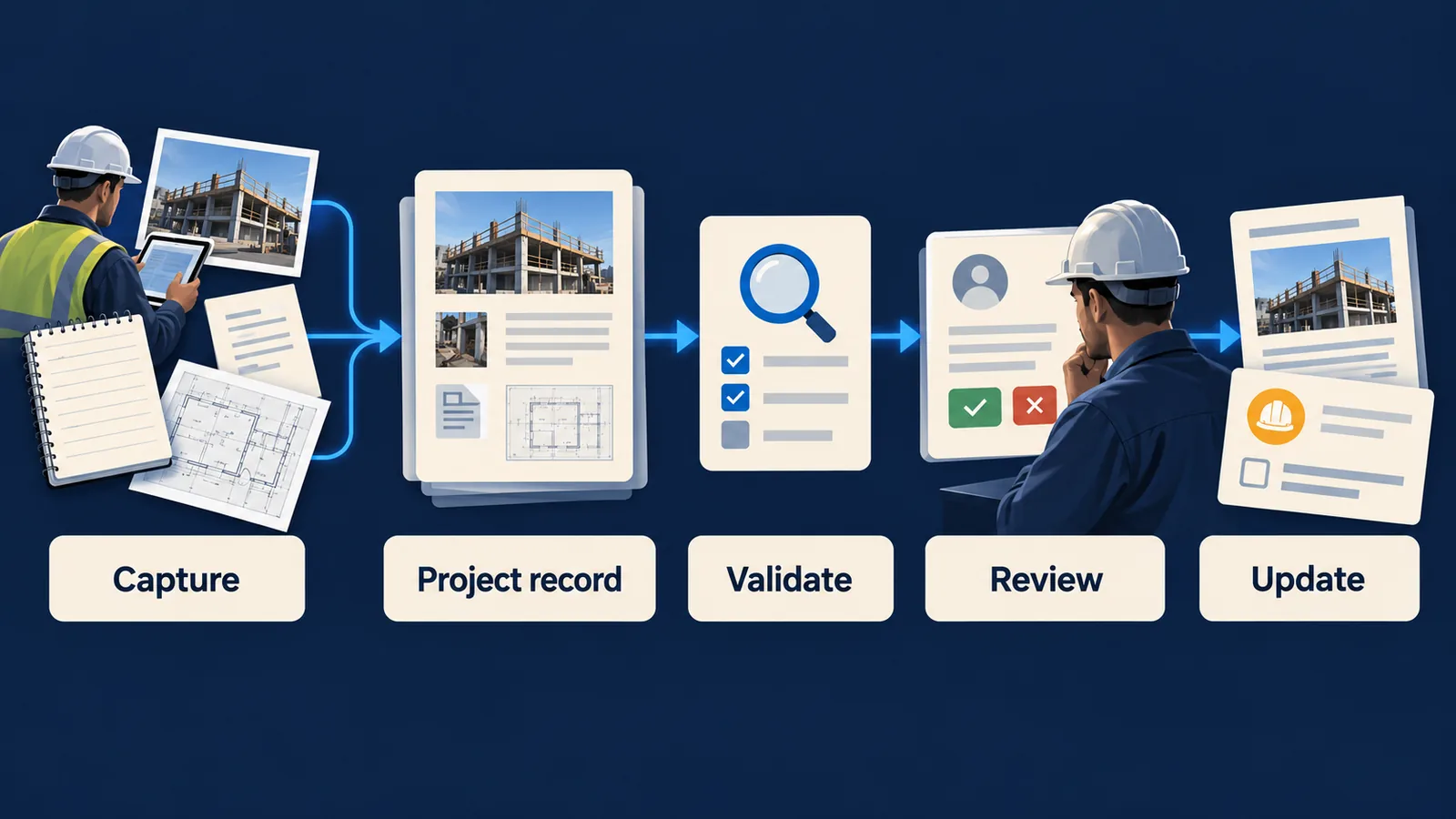
Worked example: follow RIV-026 from a field note to three office records
The reference project is a small commercial retrofit with work in service corridor C. One field submission contains labour, quantities, a delayed delivery, a customer request and a missing attachment. Those facts affect different records and need different decisions. The example lets you inspect the inputs instead of assuming every field arrived clean and complete.
The field lead reports six installers working 07:00–15:30 with a half-hour unpaid break, but the sheet says 52 labour hours. Twenty access panels were delivered and eighteen installed. The delivery was 90 minutes late while the crew worked elsewhere. A customer also requested two additional panels. The second photo will arrive the next day.
A useful design preserves all of that evidence without flattening it into one approved status. The roster discrepancy needs factual clarification; the extra panels need a separate change decision; the late photo needs a completeness and revision policy. The same source can support several records without granting the same authority to each one.
| Record | Evidence carried forward | Decision still required |
|---|---|---|
| DR-014 daily report | NOTE-014, roster, delivered/installed quantities and photo register | Field lead confirms hours; report reviewer checks the factual account |
| CR-007 proposed change | Customer request for two extra panels and relevant scope context | Contract-defined roles review cost, schedule and authority |
| DOC-02 document exception | Replacement evidence names RME Services Example Ltd rather than the registered subcontractor | Qualified reviewer resolves entity mismatch |
- Reference-pack instructions (TXT)
- Source event and ten labelled validation cases (JSON)
- Ten end-to-end acceptance scenarios (CSV)
Worked example data, version 1.0. Adapt the structures to your project; these are not real supplier, insurance or clearance documents.
A reference workflow map with ownership and holding states
Use this map as a conversation with the people doing the work. Each lane has an output the next owner can inspect. The example assumes a project coordinator prepares records, a field lead confirms observations and authorized reviewers make the relevant decisions. Substitute your actual roles before treating the map as an operating procedure.
The important boundary is the reviewed destination record. A successful extraction or notification is an intermediate event. If the destination update is uncertain, leave the item in reconciliation with an owner rather than declaring success or starting a fresh item.
- Field → submit EVT-014Keep the original note, observed date, received timestamp and evidence references. A late sync retains the work date.
- Intake → match RIV-026Validate the project and source identifier. An unmatched project enters a holding queue; an existing event is reconciled.
- Preparation → draft separate recordsCalculate the roster check, preserve both quantities and flag CR-007 as proposed. No authority is inferred.
- Review → resolve each decisionField clarification resolves the hours; the change and document exceptions remain with their own decision owners.
- Release → verify destinationStore the released report version and destination ID. Complete downstream tasks only from the applicable approved state.
- Operations → monitor and recoverTrack unanswered clarifications, pending decisions and uncertain writes. Escalate by consequence and due action.
Read the raw input and completed daily-report example, then inspect CR-007's version change and the document register to see where the decisions diverge.
The minimum record contract between tools
A record contract is the agreement about what one step provides to another. Keep project_id, source_event_id, observed_date, received_at, record_version, evidence references and current decision state available throughout the journey. Also keep the old and proposed values when a correction is under review. Without those identifiers, an apparently simple connector becomes difficult to explain or recover.
Choose the authoritative system for each state. For example, the project system may own the issued report while the approved change register owns change status. Email can provide a request or notification, but its wording should not silently override either state. Record which event is allowed to advance a record and which role can supply that event.
Duplicate protection needs a durable source-event record and an atomic way to claim an event before a side effect. A source ID stored in a spreadsheet after sending is not enough when two runs arrive together. The small validator in this pack demonstrates detection with a supplied seen-ID list; a production system needs persistent storage, transaction or uniqueness controls and destination reconciliation.
source_event_id: EVT-014
project_id: RIV-026
observed_date: 2026-10-20
received_at: 2026-10-20T16:12:00-05:00
report_id: DR-014
report_version: 1
state: review_required
reasons: [labour_mismatch, photo_pending]
proposed_change_id: CR-007
change_state: awaiting_authorized_decision
next_owner: Project reviewer B
destination_id: null until verified
A correct schema makes fields predictable. It does not establish that the facts, authority or evidence are correct. Keep business validation after extraction even when a model returns valid structured output.
Run the acceptance tests before measuring time saved
The pack includes ten labelled checks for a small field-submission validator and ten wider acceptance scenarios. The first set exercises deterministic fields; the second asks whether the complete workflow preserves the right record and permitted action. Passing the validator alone is not evidence that the entire construction workflow is production-ready.
Begin in a test environment or with drafts that cannot issue reports or change project records. Have a reviewer define the expected outcome before running a model. Include both correct inputs and awkward cases. Keep a hold or review result distinct from a failed execution so the team can tell intentional containment from broken software.
For a pilot, measure preparation minutes, verification minutes, correction count, outstanding decisions and duplicate actions. Keep sample size and date range visible. Do not multiply a few clean examples into a claim about annual savings; include the difficult cases and the ongoing time needed to keep the workflow operating.
| Input or event | Expected behavior | Failure to watch for |
|---|---|---|
| 52 reported hours; roster calculates 48 | Review with both values and a field clarification | Automatically overwriting the source or issuing the unexplained total |
| EVT-014 arrives twice | Reconcile existing records | Second report entry, second change request or duplicate notification |
| PHOTO-02 arrives tomorrow | Keep October 20 as the work date; apply revision policy | Moving the activity into October 21 |
| Change v3 arrives during review | Compare versions and renew applicable review | Reusing a decision on v2 |
| Destination times out | Check the destination by stable identifier | Blindly repeating a write that may already have succeeded |
Worked example data, version 1.0. Adapt the structures to your project; these are not real supplier, insurance or clearance documents.
node validate-field-submission.mjs field-inputs.json
1. Choose a construction administration workflow with a clear boundary
Look for work the office repeats across jobs: assembling a daily report, chasing a missing subcontractor document or preparing a change-request package. Name the event that starts the work and the approved output that ends the first scope. Automating an entire construction project is too broad to test usefully.
Review a sample of completed records with the field and office owners. Count handling time, repeated entry, missing inputs and waiting for decisions. Include unusual cases so the design reflects how people actually work when reception is poor, an attachment arrives late or a project reference is unclear.
For a structured baseline, use the automation ROI calculator. Separate staff capacity released from actual cash savings and include review, exception handling and ongoing support.
Trigger
A field submission, document arrival or change request starts one traceable item.
Boundary
The first scope ends at a reviewed report, an owned task or an approved record update.
Owner
One role owns correctness and a named fallback owns stalled work.
Measure
Track touch time, cycle time, completeness, corrections and overdue items.
2. Match every input to the right project and revision
A useful source record identifies the project, work area, date, submitting person and original evidence. Keep attachments and original wording available beside extracted fields. A filename alone is a weak way to decide which job a photo, invoice or note belongs to.
Define how the workflow resolves a missing project code, a duplicate upload or a document referring to an older drawing. Route ambiguous matches to a person rather than guessing from a customer name. Preserve the received time separately from the time the information was observed onsite.
Use a controlled document processing workflow when emails, PDFs and attachments must become structured project records. Treat extraction as preparation for validation, not proof that the record is correct.
3. Turn field updates into reviewable daily reports
Capture the facts needed for the report through channels crews can realistically use. Notes, forms, photos and voice transcription can feed a draft, provided the source remains attached and uncertainty is visible.
The construction daily report workflow explains project matching, required fields, corrections and release. It separates what was observed, what is missing and what a reviewer has confirmed.
Do not fill missing labour hours, weather, quantities or inspections with plausible guesses. A complete-looking report that silently invents facts creates more work when the team later needs to reconstruct what happened.
4. Prepare change evidence and route the decision
Capture the proposed change, reason, affected location, relevant drawing revision and available cost or schedule evidence. Give the responsible person a review package that distinguishes requested, under review, returned, approved and rejected states.
Use the construction change order approval workflow for that administrative sequence. The governing contract and authorized project roles determine notice, instruction and approval requirements; automation should follow those requirements rather than invent them.
A request being logged, priced or discussed does not establish that a scope change is authorized. Keep the approval event, approved version and downstream record updates explicit.
5. Track subcontractor documents through collection and review
Create a requirement register by subcontractor, project and document type. Track what is requested, received, awaiting review, accepted under the applicable requirement, expiring or overdue. Separate file receipt from verification of its contents.
The subcontractor document tracking checklist covers owner assignment, expiry reminders, replacements and exceptions. Requirements vary by contract, jurisdiction and work; the register should identify who maintains them.
6. Pilot one project and test the exceptions
Run the workflow alongside the current process on a bounded project or document type. Compare outputs with the agreed human decisions. Include missing project references, repeated submissions, late corrections, unavailable reviewers and a destination system that times out after an update.
Define a safe holding state and reconcile uncertain writes before retrying. Track correction effort and recovery time along with the time saved. Expand only after the field and office owners can operate the normal and exception paths.
Use workflow automation exception handling to document recovery. OpSmith's construction automation service connects these administrative handoffs around the team's existing tools and review responsibilities.
Current technology options and how to evaluate them
Technology choices should map to the steps above. A form or upload service captures source events; a durable record stores project and event identity; extraction or transcription prepares fields; deterministic code validates arithmetic and state; a model can draft an explanation; the project system holds the issued record. Buying a larger model does not replace those functions.
The model names below were checked against official documentation on October 28, 2026. They are candidates to evaluate, not tested winners for this example project. Availability, region, data handling, usage cost and endpoint support must be checked for the actual deployment. Keep the chosen model identifier, prompt, schema and rules version in the evaluation record.
Technology references checked October 28, 2026. No cross-model performance benchmark claimed.
| Function | Candidates or approach | Evaluate before choosing |
|---|---|---|
| General extraction and drafting | OpenAI GPT-6.1 Sol / Terra; Claude Sonnet 5.5; Gemini 3.8 Flash | Required inputs, field correctness, unsupported claims, review effort, cost and latency |
| More demanding analysis | OpenAI GPT-6 Astra; Claude Fable 5.1; Gemini 4 Argon | Whether the added capability improves your specific difficult cases enough to justify its operating cost |
| Document parsing | Azure Document Intelligence v4.0; Google Document AI | Actual layouts, fields, source locations, model/API versions and exception behavior |
| Voice-note transcription | GPT-Transcribe; Gemini 3.5 Transcribe | Representative audio, names, numbers, accents and correction time |
| Arithmetic and record state | Deterministic rules plus durable event and version storage | Known answers, conflicting events, duplicate protection and recovery |
Official references: OpenAI model catalog, Claude model selection, Gemini model catalog, Azure Document Intelligence models and Google Document AI.
Use the blank evaluation scorecard to compare the same cases. Record a sample size, test date, model ID, prompt version and human corrections. Treat provider capability claims as a starting point; publish accuracy or savings results only after the method and evidence support them.
Frequently asked questions
Does construction workflow automation require a new project-management platform?
Not necessarily. Start with the tools already used for field capture, project records and office work. Add an interface only when it solves an identified operating problem.
Can AI create construction reports from voice notes?
AI can transcribe and structure a draft when the original audio or transcript remains available. A reviewer should verify project details, quantities and material statements before release.
Can automation approve construction changes?
It can prepare evidence and route a decision. The governing contract and authorized roles determine approval; logging or drafting a request does not establish authorization.
Which construction workflow should be automated first?
Choose a recurring administrative handoff with measurable effort, stable inputs, a clear owner and an output that can be checked. Daily-report preparation or document follow-up can be practical bounded candidates.
How should offline field submissions be handled?
Preserve the original event time and a stable submission identifier, then synchronize when connectivity returns. Validate project context and prevent duplicate processing on retries.
Sources and further guidance
These official references provide relevant technical, privacy, risk-management or accountability guidance. OpSmith applies the useful principles to the operation of one business workflow.
- Construction Document Management 101Procore
- CCDC 16: Guide to Changes in the ContractCanadian Construction Documents Committee
- ClearancesWorkers Compensation Board of Manitoba