
- Separate a reported issue, proposed change, priced request and authorized change in the record.
- Attach the scope, source evidence, cost and schedule information needed by the applicable approver.
- Bind each approval to a version and re-evaluate it when material details change.
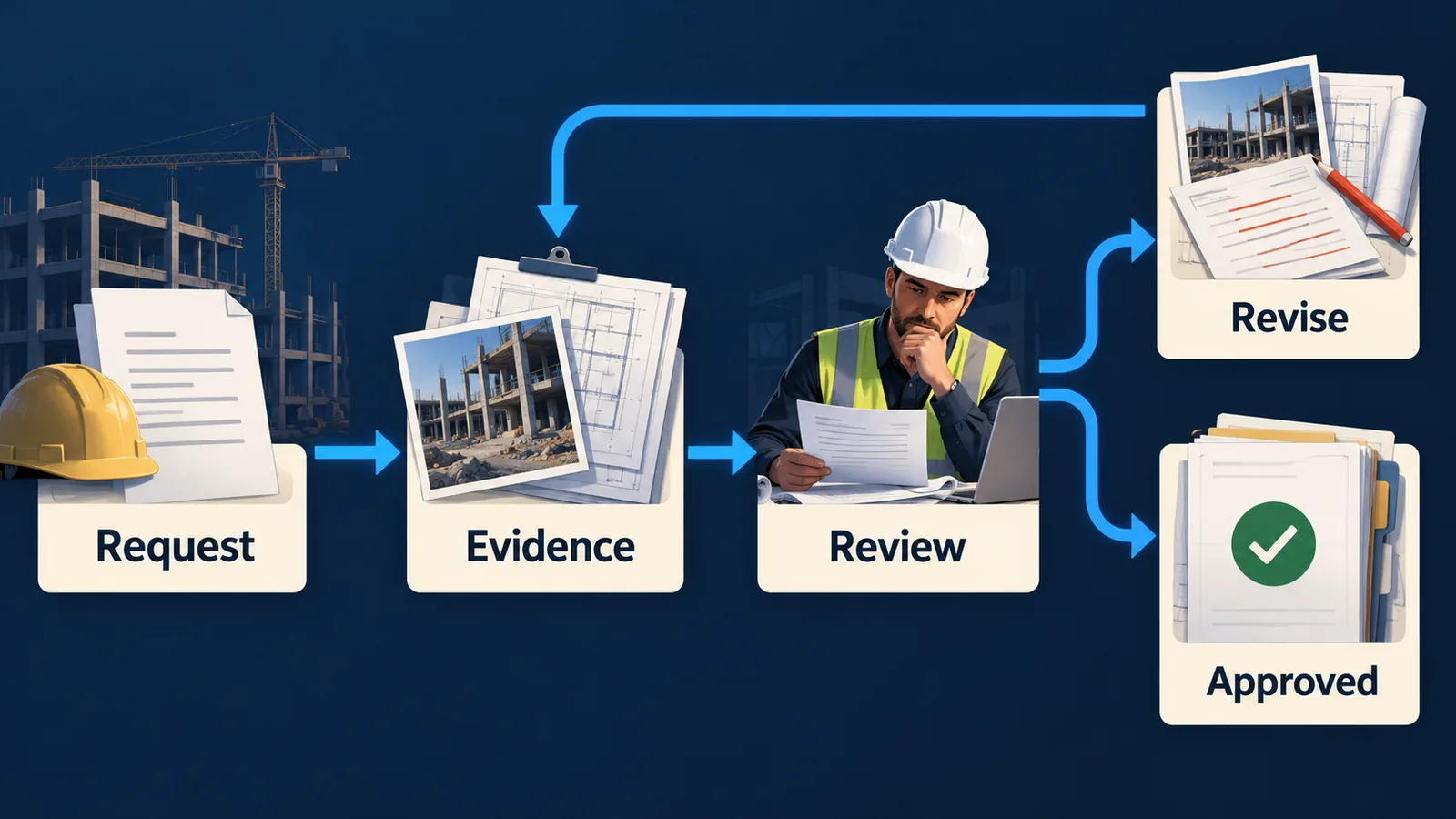
Worked example: CR-007 increases from CAD 1,250 to CAD 1,460
The RIV-026 field note records a customer request for two additional access panels. That creates a proposed change, CR-007, rather than authorizing work. In the example, a preparer has a CAD 1,250 proposal at version 2. Replacement cost support arrives before the authorized decision, creating version 3.
The teaching cost basis for version 3 is CAD 620 in materials, eight labour hours at CAD 85 and CAD 160 in equipment. The proposed total is CAD 1,460, an increase of CAD 210. Taxes, markups, contract adjustments and schedule effects are not modelled; the package must identify those limits rather than present the amount as a final contractual price.
The key output is a complete enough decision packet with a visible version difference. It remains awaiting_authorized_decision. The project team follows the applicable contract process to determine what review and authorization are required. A correct sum only proves arithmetic on the supplied numbers.
| Component | Basis | Proposed CAD amount |
|---|---|---|
| Materials | Example supplier support SUPPLIER-QUOTE-v3 | 620 |
| Labour | 8 hours × 85 | 680 |
| Equipment | Example allowance | 160 |
| Proposed total | 620 + 680 + 160 | 1,460 |
| Difference from v2 | 1,460 − 1,250 | +210 |
Worked example data, version 1.0. Adapt the structures to your project; these are not real supplier, insurance or clearance documents.
The evidence packet: completed fields and unresolved decisions
Put the current scope reference, proposed difference, cost basis, schedule assessment and requested decision on one cover record. Attach source evidence through stable references and show the revision that each attachment supports. A reviewer should be able to distinguish a fact supplied by the customer, a preparer's assumption and a term inherited from the contract.
For this example, the source is NOTE-014, the requested difference is two additional panels in corridor C, and the proposed amount is version 3's CAD 1,460. Schedule effect is not yet assessed. The authority field points to the project's contract-defined approver; it is not filled with the name of whoever last emailed the estimate.
A package can be administratively ready for an identified review while still containing an open question. Make that question explicit: who must assess the schedule impact, what evidence is needed and whether the authorized decision can proceed before it is resolved. Do not let a green completeness indicator conceal an unknown that changes the decision.
| Field | Example value | Review implication |
|---|---|---|
| Origin | NOTE-014 / customer request | Request evidence, not proof of approval |
| Scope | Two additional access panels, corridor C | Compare with the current approved scope |
| Cost support | SUPPLIER-QUOTE-v3; CAD 1,460 proposed | Example basis; tax and contract adjustments unmodelled |
| Schedule | Not assessed | Named planning owner must supply or explicitly resolve it |
| Decision state | awaiting_authorized_decision | No automatic budget, purchasing or work release |
| Version control | v2 superseded; v3 current proposal | Earlier review or decision does not silently transfer |
Decision rules for revisions and conflicting events
Evaluate a material revision against the authority model before carrying forward any decision. In a configured process, a change to quantity, price, schedule or a controlled term can invalidate the corresponding review. A spelling correction may follow a lighter path. Those categories must be approved business rules, not a language model's unrecorded judgment.
Tie every decision to change_id, version, reviewer, decision type and time. If a decision on v2 arrives after v3 was created, preserve the decision against v2 and alert the current owner. It should not advance v3 merely because the subject line contains approved. This is an event-order problem that tests should exercise deliberately.
A withdrawal also needs a current state and owner. Cancel pending decisions or downstream tasks according to policy, but keep the history. If an approval and withdrawal race, hold consequential actions until the current authorized state has been reconciled. Do not resolve the conflict by choosing whichever message arrived last.
| Event | Permitted state change | Required control |
|---|---|---|
| New material version | Prior proposal superseded; current version awaits review | Show changed fields and reassess applicable approvals |
| Decision refers to an old version | Record decision only against that version | Notify owner; do not approve current version |
| Reviewer asks a question | Returned or awaiting information | Record requested evidence, owner and due action |
| Current authorized approval recorded | Approved under the actual project process | Verify scope, conditions and permitted downstream actions |
| Write returns no confirmation | Reconciliation pending | Look up stable destination key before retry |
A reference recovery sequence after an uncertain update
Suppose an authorized decision has been recorded and a connector sends the approved record to the project system, but the connection times out. The timeout does not establish whether the write failed. Preserve the approved version and integration event, then query the destination using the stable project/change/version key.
If the matching destination record exists, compare its version, values and status with the approved package and attach its identifier. If no record exists and the system supports a safe idempotent create, retry within the configured policy. If a conflicting record exists or the result remains unavailable, hold further actions and escalate with the relevant evidence.
Log recovery separately from the business decision. An integration operator should not need to reapprove the scope to resolve a connector failure. Conversely, a technical retry must not expand the scope, change the price or send an unapproved instruction. Test both the existing-record and no-record paths before enabling writes.
decision_key: RIV-026 / CR-007 / v3
1. Confirm the current authorized decision and conditions.
2. Claim a durable integration event for the permitted action.
3. Submit using the destination's supported duplicate protection.
4. On timeout, query by the stable business key.
5. Matching record: attach destination ID and verify state.
6. No record: retry only under the approved safe-create policy.
7. Conflict or unavailable evidence: hold and escalate.
8. Record recovery; do not change the business decision.
Worked example data, version 1.0. Adapt the structures to your project; these are not real supplier, insurance or clearance documents.
2. Capture the request and preserve the source
Create one change identifier and link it to the project, affected area, originating request, current drawing or specification references and related correspondence. Retain the original message or field record beside the structured description.
Describe the difference from the current approved scope in plain language. Avoid overwriting the base scope or treating a verbal discussion as an approval event. Route unclear instructions or conflicting references to the responsible person for resolution.
A construction daily report workflow can surface the evidence for a possible change while keeping its factual reporting decision separate.
3. Assemble a decision packet the reviewer can use
Build the packet around the approver's actual decision. Required details depend on the project, but a consistent evidence structure helps expose omissions before the request reaches that person.
Scope and reason
What is proposed, why, where it applies and how it differs from the approved baseline.
Source references
The originating instruction or request, relevant drawings, photos, correspondence and version identifiers.
Cost basis
Reviewed quantities, rates, supplier or subcontractor support and any exclusions or assumptions required by the process.
Schedule effect
The stated time impact, dependencies and unresolved planning questions, with the responsible reviewer.
Decision authority
Required reviewers and approvers, decision order and the applicable process reference.
Record control
Request version, current state, open questions, due action and the approved destination record.
4. Validate completeness and route review
Check project identity, referenced revisions, required evidence and calculation consistency before routing. A missing schedule assessment or conflicting cost attachment should be visible to the reviewer rather than hidden behind a complete status.
AI can help summarize correspondence, extract proposed changes and list missing evidence. It should not infer contractual authority, invent cost support or decide whether the request is payable. Preserve source references and use a person for consequential interpretation.
OpSmith's document processing automation can prepare structured evidence and route exceptions. Use human-in-the-loop automation to define who reviews uncertain or material statements.
5. Record the decision and update downstream work
Bind the decision to the package version, decision-maker, time and applicable conditions. A returned request needs a reason, required correction and next owner. An approved item needs a controlled record of what was approved and where it was communicated.
Define the permitted downstream updates: project scope, budget, schedule, purchasing, customer communication or billing preparation. Trigger them from the verified authorized state rather than a draft label or an email keyword.
If cost, scope or schedule changes after approval, route the revision according to the project's change process. Preserve the earlier approved record and communicate the current status to people relying on it.
6. Monitor decision age, returns and update reliability
Track requests waiting for evidence, items under review, returned packages, overdue actions and approved changes awaiting downstream updates. Segment delays by reason so reminders do not substitute for resolving missing information or authority.
Test an unavailable approver, conflicting instructions, a replaced attachment, a request withdrawn during review and an uncertain destination update. Use a safe holding state until the applicable decision and record version are clear.
The broader construction workflow automation guide connects this process to field evidence and office reporting. OpSmith's construction automation service can implement the administrative flow around the team's approved project rules.
Current technology options and how to evaluate them
A language model can summarize correspondence, extract candidate scope changes and describe differences between two versions. Current candidates such as GPT-6.1 Sol, Claude Sonnet 5.5 or Gemini 4 Argon need a task-specific evaluation; the provider's general capability description is not evidence of contractual reliability on your records.
Calculate amounts and version differences in deterministic code, with the project's approved currency and rounding rules. Retrieve the relevant approved project terms with source references when useful, but keep interpretation and authorization with the designated roles. The model should produce proposed evidence and questions, never a new authority policy.
Measure missed scope differences, unsupported interpretations, wrong-version decisions and reviewer correction time. The price-change example tests whether an implementation preserves v2 and v3; it does not benchmark a model or establish a contract price. Reject malformed or unsupported output before it reaches a consequential action.
Technology references checked October 28, 2026. No cross-model performance benchmark claimed.
Official references: OpenAI model catalog, Claude model selection, Gemini model catalog, Azure Document Intelligence models and Google Document AI.
Use the blank evaluation scorecard to compare the same cases. Record a sample size, test date, model ID, prompt version and human corrections. Treat provider capability claims as a starting point; publish accuracy or savings results only after the method and evidence support them.
Frequently asked questions
Is a change request the same as an approved change order?
No. A request records a proposed change. The governing contract and project process determine the documents, authority and decisions needed to establish an approved change.
Can a reminder email count as a contractual notice?
Do not assume it does. The responsible contract administrator should define the applicable notice requirements and approved method before the workflow is configured.
What should happen when a change amount is revised?
Create a controlled revision, identify what changed and apply the project's rules for renewed review and approval. Keep prior versions and their decisions available.
Can AI approve a construction change order?
AI can prepare summaries and identify missing evidence. Authority, contractual interpretation and material financial or scope decisions belong to the roles established by the contract and business process.
Does this workflow determine when changed work may begin?
No. The applicable contract, instructions and authorized project roles determine that. Configure the workflow to record and follow those decisions rather than infer permission from an administrative status.
Sources and further guidance
These official references provide relevant technical, privacy, risk-management or accountability guidance. OpSmith applies the useful principles to the operation of one business workflow.
- CCDC 16: Guide to Changes in the ContractCanadian Construction Documents Committee
- Construction Change ManagementProcore