
- Validate the source set and reporting period before calculating metrics.
- Reconcile totals and investigate material variance against source evidence.
- Record failed checks, accepted limitations and approval instead of correcting data invisibly.
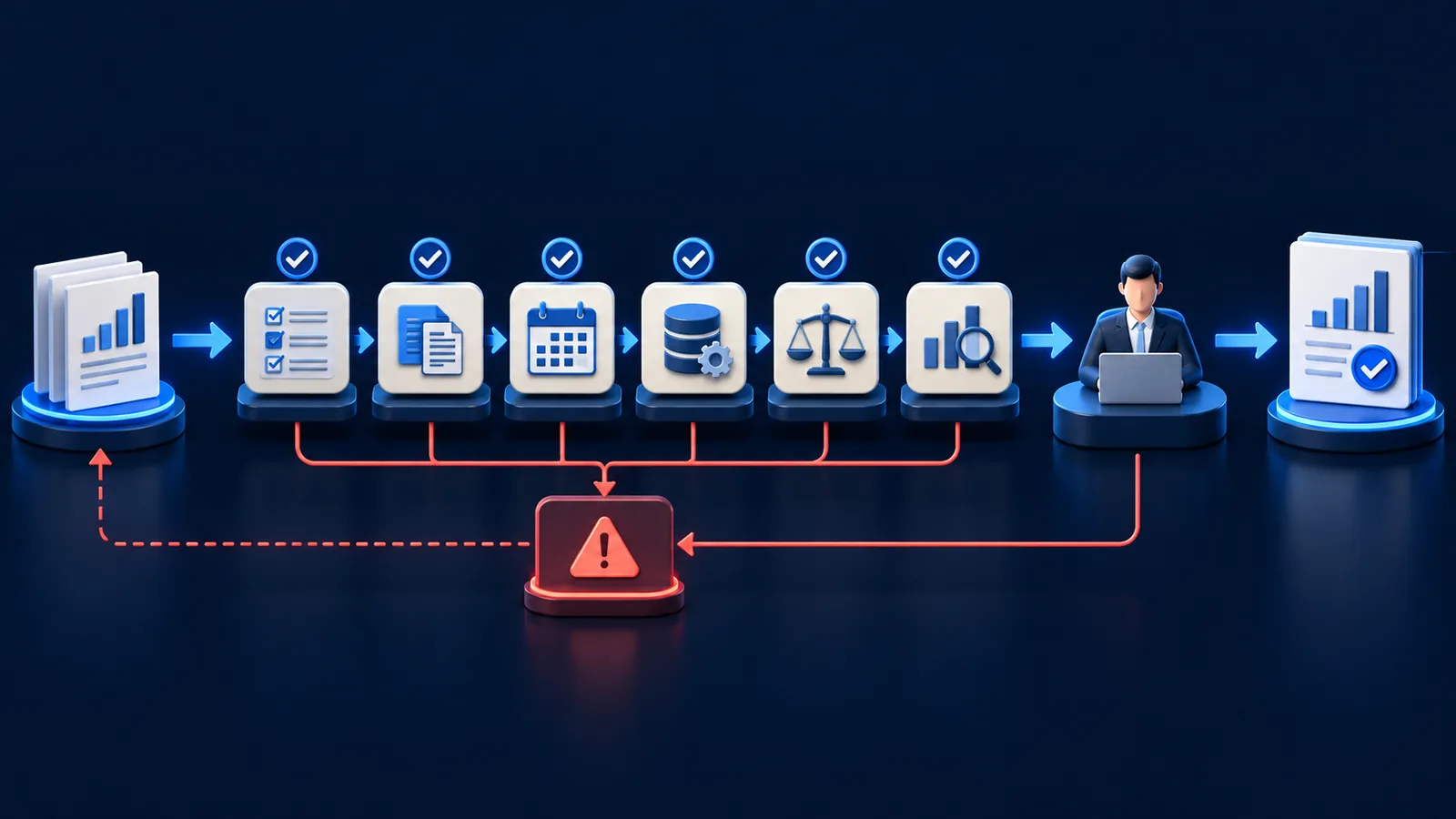
Six deliberate report failures with independently defined outcomes
The supplied validation-case sheet changes one condition at a time. It repeats R2, moves R3 to a different period, removes open work from the denominator, turns missing R6 hours into zero and asks the narrative to invent a staffing explanation. These are different classes of failure even if they all produce a polished-looking report.
Start from the known answers: six expected records, four complete, five verified-hour inputs and a known-hours subtotal of 35. Keep these labels independent of the implementation. If a rule configuration produces another answer, investigate the difference rather than updating the expected result to match the system.
A complete validation report states pass, fail or unavailable for each relevant check and identifies the consequence. The baseline itself has incomplete source evidence, so a qualified-review outcome is expected. Do not require every sample to be either an unconditional success or a broken run; a controlled limitation can be a legitimate result when the responsible person accepts it.
Worked example. The supplied records and decisions are inspectable reference material, with no claimed customer results or measured model performance.
| Alteration | What it changes | Expected response |
|---|---|---|
| Repeat R2 | Identity and population | Stop unchecked calculation |
| Move R3 period | Inclusion window | Review population and comparison |
| Drop open records | Metric definition | Reject inflated denominator logic |
| Set R6 to zero | Source provenance | Reject invented value |
| Blame staffing | Narrative support | Review unsupported causal claim |
Download the working files
Use the completed example and templates alongside this guide. Files open directly with no signup.
- Labelled report validation cases
- Original source snapshot
- Metric definitions and missing-data rules
- Reference-library instructions and example limits
- Complete reference library with local check script (ZIP) — extract the files before running the optional check.
1. Confirm source completeness and authority
Compare received inputs with the source register. Confirm every expected business unit, file, table or owner update is present and that the reporting workflow used the approved source rather than an convenient export.
Record extraction time and source version. When an input is missing, identify the affected measure and apply the missing-data policy before the report proceeds.
Expected inputs
Every required source and reporting unit is accounted for.
Authoritative source
The origin matches the approved system or documented substitute.
Freshness
The snapshot or update meets the reporting cutoff.
2. Test reporting period and record identity
Check date boundaries, time zones and status timestamps. Confirm records are included once, assigned to the intended period and not duplicated across joins or repeated file loads.
Use stable business identifiers where possible. A name or description alone is rarely a safe join key.
Period boundaries
Earliest and latest included records match the approved window.
Duplicates
Repeated records, uploads and many-to-many joins are detected.
Population count
Record counts reconcile before and after transformation.
3. Verify metric definitions and transformations
Test filters, status groups, numerator, denominator, currency, units, rounding and treatment of blanks. Compare automated calculations with a small set of manually verified records.
Material transformation changes should be versioned and approved. If prior periods are recalculated, disclose the restatement.
Known-answer tests
Representative records produce the expected calculation.
Boundary cases
Cancelled, reopened, zero, blank and cutoff records follow policy.
Definition version
The report identifies the approved rule set in use.
4. Reconcile totals and relationships
Compare report totals, control accounts or record counts with authoritative systems. Test relationships between measures—for example, a component total should not exceed its population without an explained reason.
A reconciliation difference needs an owner and disposition. Do not apply a balancing adjustment that conceals the cause.
Source totals
Key amounts and counts match an independent control where available.
Cross-metric logic
Related measures obey expected mathematical and business relationships.
Difference register
Every unresolved variance has evidence, impact, owner and due date.
5. Investigate material variance and plausibility
Compare the current result with the prior period, plan or an operational range. A large movement may be real, but it deserves source-level evidence before commentary claims a cause.
Set review thresholds according to decision consequence. Avoid rigid percentage alerts that overreact to small denominators or miss significant absolute changes.
Absolute and relative
Review both value and percentage movement in context.
Operational plausibility
Impossible combinations and out-of-range values are flagged.
Evidence for explanation
Narrative claims point to supporting records or owner updates.
6. Record exceptions, approval and release
Route failed checks through defined workflow exception handling. The reviewer should see the impact, evidence and proposed disposition: correct, qualify, exclude, defer or hold.
Preserve the validation result and approved report together. This creates a usable audit trail and gives the next reporting cycle evidence about recurring weaknesses.
Accepted limitation
The reader can see what is incomplete and which conclusion is affected.
Accountable approval
A named reviewer owns the release decision and time.
Controlled correction
Post-release changes retain the original and explain the restatement.
7. Automate the checklist without hiding it
Implement deterministic checks first: expected files, row counts, date windows, unique keys, allowed values, calculation tests and reconciliation thresholds. Send failures to a visible queue with source evidence.
Use the Reporting Workflow Builder to document the plan, or review OpSmith's reporting automation service for a connected implementation.
Design a validation record the reviewer can use
For each measure, attach the approved definition, source identifiers, validation results and known gaps. A rule should say what is wrong and which claim it affects. A generic data quality warning forces a reviewer to rediscover the relationship between a missing record and the report's headline.
Reconcile counts and totals before and after joins or transformations. A duplicated row can preserve each field's valid format while corrupting the aggregate. Compare record identities and expected populations, not only whether totals look plausible. Keep the source snapshot used for the issued report so checks can be rerun later.
Record accepted limitations separately from passed checks. If the reviewer accepts the known-hours subtotal, that does not make full-period hours complete. The final report should preserve the limitation in its visible wording. Use the distinction when designing automated tests so a human override cannot silently relabel failed evidence as verified.
Try it with your own process
Apply each alteration from the CSV and identify the first gate that should catch it. Write the reviewer-facing explanation with the affected record or measure. Then restore the baseline and produce a qualified result that includes R6 rather than hiding it. Your output should explain both the valid calculations and what remains unknown.
Acceptance checks for this example
- Record identity is checked before aggregation.
- A definition change cannot pass as a normal period update.
- Accepted limitation remains visible in the issued wording.
Technology choices and what to test
Use deterministic checks for counts, joins, dates and calculations. Current models can help compare draft wording with a supplied evidence package, but their critique needs evaluation against known supported and unsupported claims.
When testing GPT-6.1 Sol, Claude Sonnet 5.5 or a Gemini candidate, keep the expected rule outcomes fixed. Do not let the model redefine completeness or invent causation to improve readability. Log review corrections independently of whether its JSON satisfies a schema.
Technology references checked October 28, 2026. Model availability and platform behavior can change; confirm the current documentation before implementation.
Compare candidates on a labelled sample from the intended workflow: correctness, preserved unknowns, unsafe proposed actions, reviewer effort, latency and cost. Keep expected outcomes separate from generated answers. Record model identifier, settings, prompt, rules and connector version so a change can be tested against the same cases.
Reconcile transferred records before relying on aggregate totals
Use source-to-destination data reconciliation when reporting inputs arrive through an integration. Equal totals can conceal missing and duplicate records, and incomplete query coverage must remain visible before distributing a conclusion.
Frequently asked questions
What should be validated before releasing a report?
Validate source completeness, authority, freshness, period boundaries, duplicates, metric definitions, transformations, reconciliation, material variance, exceptions and approval.
Should missing report data be entered as zero?
Only when the approved business definition says zero is the correct value. Otherwise mark it missing, route the issue and qualify or hold the affected result.
How can report validation be automated?
Use deterministic tests for expected inputs, schemas, periods, unique keys, allowed values, calculations and reconciliations, with human review for material exceptions.
Who approves report validation exceptions?
The accountable business owner or delegated reviewer who understands the affected decision and has authority to accept, correct, qualify or hold the report.
Sources and further guidance
These official references provide relevant technical, privacy, risk-management or accountability guidance. OpSmith applies the useful principles to the operation of one business workflow.
- Data profiling tools in Power QueryMicrosoft
- The Aqua Book: guidance on producing quality analysisUK Government