
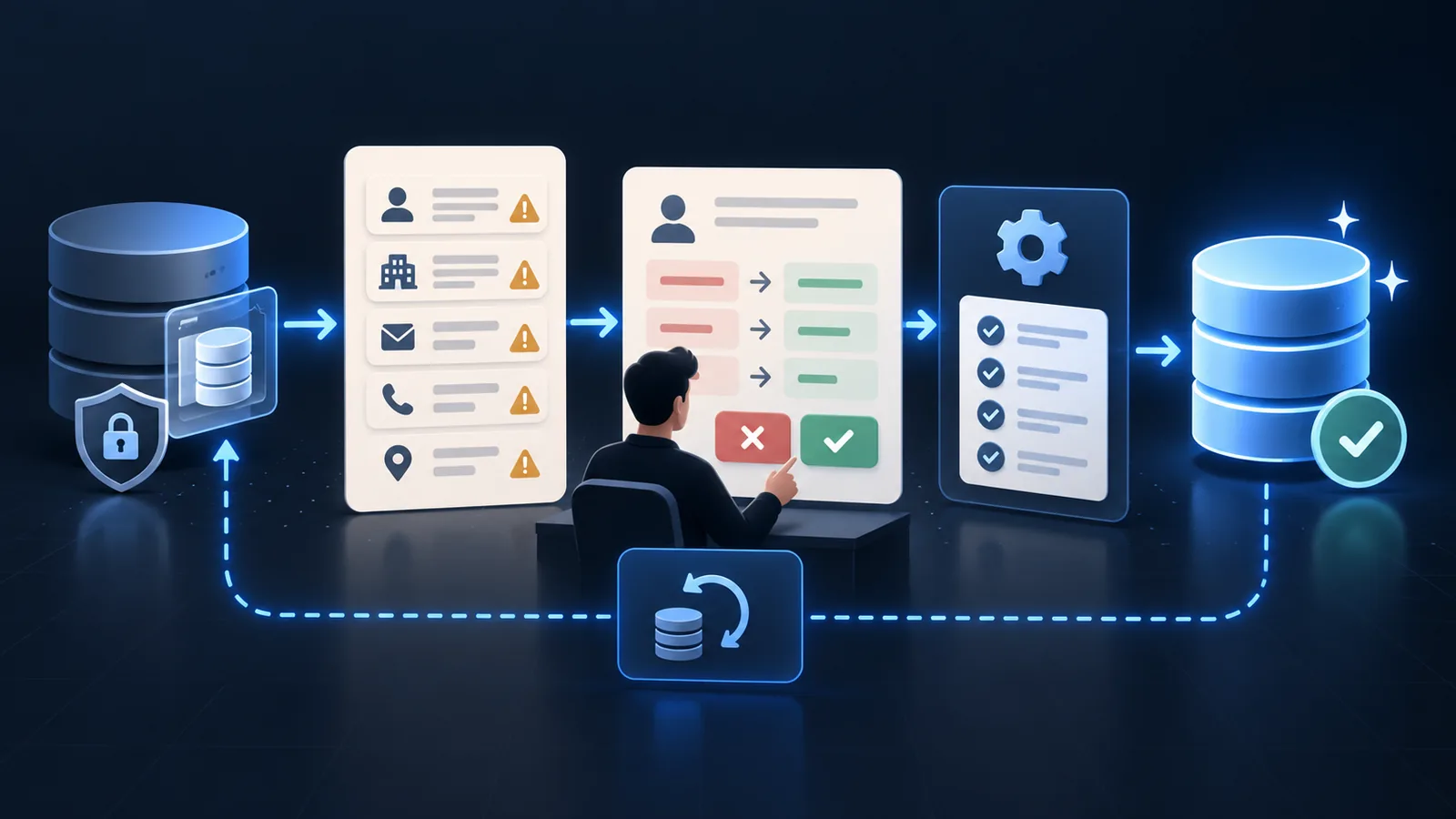
- Back up the affected records, reports and relationships before changing production data.
- Separate deterministic corrections from identity, ownership, consent and history decisions that need review.
- Validate each batch against business outcomes, then add prevention controls at the source that created the defect.
1. Define the cleanup outcome and freeze the scope
Name the workflow the cleanup must improve: lead response, quoting, renewals, customer service or reporting. Identify the record types, fields, date range, active processes and connected systems in scope. Do not begin with every imperfect field in the CRM.
Use the broader CRM data quality guide to define what accurate, complete and current mean for the decisions these records support.
Outcome
The business action that should become more reliable after cleanup.
Boundary
Included objects, fields, integrations, automations and reporting periods.
Owner
The person authorized to approve corrections and resolve ambiguous cases.
2. Protect the source and create a baseline
Export or snapshot the records, identifiers, relationships, owners and controlled fields that may change. Record the extraction time and the systems that can continue updating the same records during cleanup. Pause only the specific imports or automations that would make the batch unsafe.
Count issues before correcting them: exact and possible duplicates, invalid formats, missing decision fields, inactive owners, stale open records, conflicting lifecycle stages and values outside approved lists. Keep these as a baseline for later verification.
Recoverability
Previous values and relationships can be restored if the rule produces an incorrect result.
Reconciliation
The team can account for every input record after the batch is applied.
Change control
Concurrent imports, integrations and manual edits cannot silently invalidate the cleanup evidence.
3. Classify issues by risk and decision type
A normalized province code and a disputed account owner are not the same kind of correction. Classify each issue by certainty, consequence and reversibility. This determines whether the system can correct it, propose a change or hold it for an authorized person.
Safe deterministic changes have an agreed input and output, such as removing leading spaces or mapping a retired dropdown value to its approved replacement. Identity merges, consent changes, relationship changes and overwriting conflicting customer information normally require stronger evidence and review.
Auto-correct
High-confidence, reversible formatting or controlled-value transformations.
Propose
A likely correction with source evidence that a reviewer can accept, change or reject.
Escalate
A consequential or ambiguous record requiring the responsible business owner.
Leave unchanged
A known imperfection that does not justify the risk or cost of alteration.
4. Run cleanup in a dependency-aware order
Correct the values used for matching before resolving duplicates, resolve identities before changing ownership and verify owners before recalculating routing or pipeline reports. The sequence matters because an early change can alter which records later rules select.
Handle identity conflicts with the dedicated guide to duplicate records in CRM. Do not use an aggressive merge rule merely to make a dashboard count smaller.
Normalize
Apply approved formats and controlled values without changing the meaning.
Resolve identity
Separate confirmed duplicates, possible matches and legitimate separate records.
Repair ownership
Reassign inactive, missing or invalid owners with a reason and effective date.
Review lifecycle
Correct stale status and next actions only when operating evidence supports the change.
5. Test a representative batch before scaling
Choose examples that include the normal case and the awkward cases: shared company domains, family email addresses, renamed organizations, inactive employees, imported records and records with valuable activity history. Run the exact transformation in a test environment or on a tightly bounded production batch.
Inspect more than the edited field. Verify record relationships, activity history, assignment, workflow enrollment, reports and connected-system behaviour. A syntactically correct update can still break a business process.
6. Reconcile the output and record exceptions
For each batch, reconcile input count, updated count, unchanged count, exception count and failed count. Sample corrected and untouched records. Confirm that every failure has an owner and that retrying will not repeat successful updates.
Keep the transformation rule, date, operator, affected identifiers, review decisions and validation results. This change register is what lets the team explain a later report difference or safely reverse a bad correction.
7. Prevent recurrence and assign maintenance
Trace each repeated defect back to its source. Add validation, matching, field ownership, import controls or clearer user choices where the record enters. Monitor the source after release rather than scheduling another cleanup by default.
If the work is recurring across forms, inboxes and connected systems, CRM data-entry automation can apply the approved controls during intake instead of relying on periodic correction.
For ongoing monitoring, exception recovery and controlled improvements, consider managed automation services after the cleanup rules have been proven.
Frequently asked questions
What should be cleaned first in a CRM?
Start with defects that block a valuable workflow: unowned active leads, duplicate customer identities, invalid contact details or fields that drive routing and reporting. Do not prioritize fields only because they are easy to count.
Should old CRM records be deleted?
Not automatically. Define retention, legal, contractual, reporting and customer-service requirements first. Archive, anonymize, suppress or delete only through an approved policy with recoverability and appropriate privacy safeguards.
Can CRM cleanup be automated?
Deterministic, reversible corrections can often be automated. Identity merges, conflicting source values, consent information and consequential ownership changes usually need stronger controls or human review.
How do we know a cleanup worked?
Reconcile every batch, sample outcomes, test affected workflows and reports, and compare defect creation after prevention controls are added. A lower issue count alone is not enough.
Sources and further guidance
These official references provide relevant technical, privacy, risk-management or accountability guidance. OpSmith applies the useful principles to the operation of one business workflow.
- PIPEDA self-assessment toolOffice of the Privacy Commissioner of Canada
- Limiting use, disclosure and retentionOffice of the Privacy Commissioner of Canada