
- Start follow-up only from a confirmed, current and approved quote state.
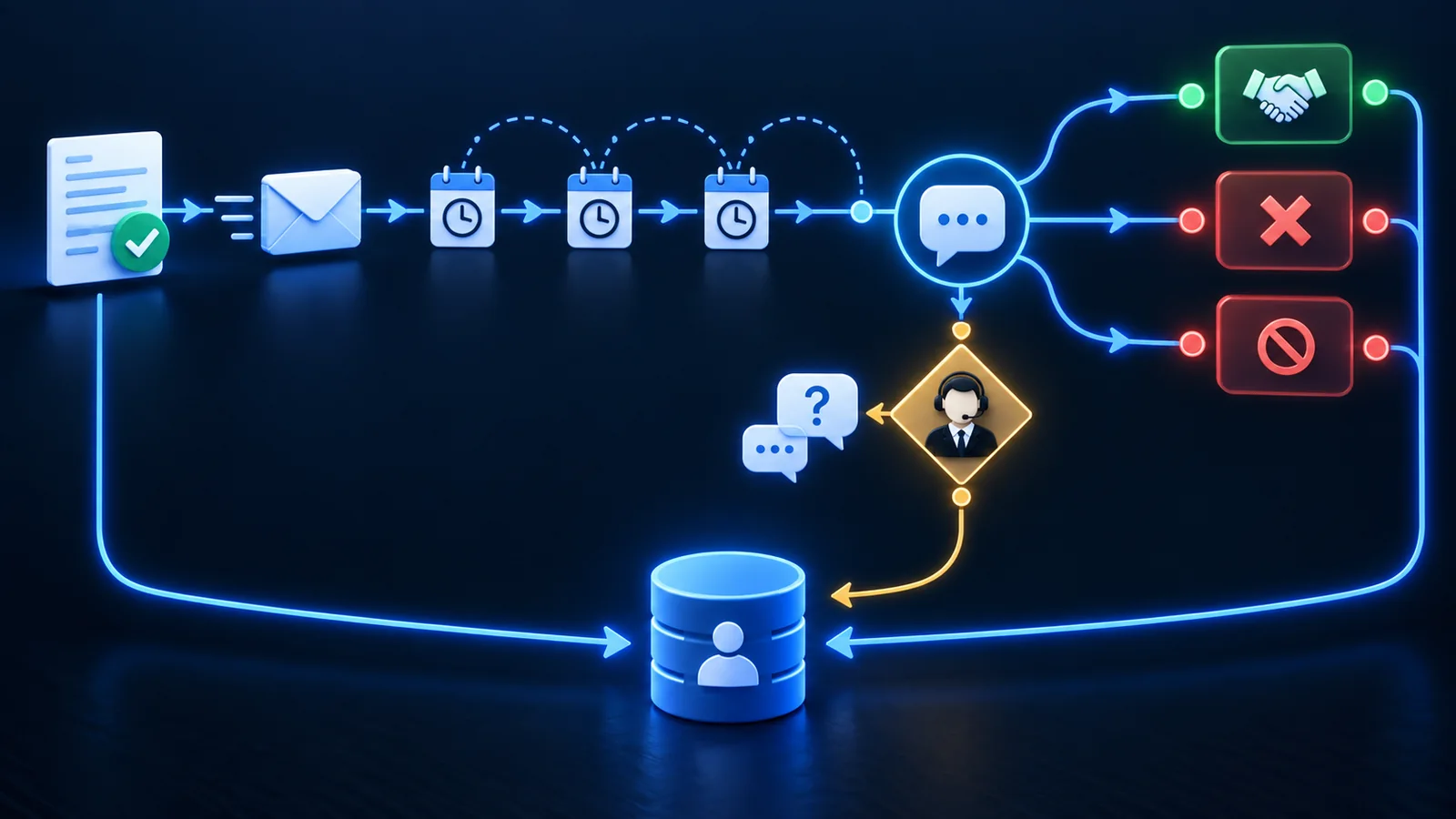
- Treat replies, acceptance, decline, revision, expiry, opt-out and human takeover as tested stop or branch conditions.
- Return every outcome to the authoritative customer and quote records so another automation does not act on stale status.
Begin with one quote and one legitimate next step
Quote follow-up begins after an approved quote has been delivered to its intended recipient. The first objective may be to confirm receipt, surface a question, remind the customer before expiry or create a human task for a valuable opportunity. It is not permission to start an indefinite marketing sequence.
The workflow depends on the upstream sales quotation process. It must know the quote identifier, version, customer, recipient, sent time, validity period, owner and current status before deciding that a message is appropriate.
Name the accountable owner. Automation can monitor and send approved messages, but a salesperson or service owner remains responsible for customer context, unusual questions, commercial changes and deciding when a personal conversation is more useful than another scheduled touch.
Trigger
Confirmed delivery of the current approved quote, not merely creation of a draft or an unverified send attempt.
Purpose
One useful customer or internal next step tied to the quote's current state.
Owner
A named person or role accountable for the relationship and unresolved exceptions.
End
An outcome, stop condition or deliberate close updates the quote and customer records.
Build a status model before a message sequence
A timer alone cannot determine whether follow-up is appropriate. Define mutually understandable states and the events that move between them. Sent, viewed, replied, revision requested, accepted, declined, expired and closed are different operating facts; do not collapse all of them into open.
Choose the authoritative source for each event. A delivery provider may confirm email acceptance but not customer understanding. A reply detector can identify a response but may not know its business meaning. A signed order may prove acceptance, while a salesperson's call note may require a reviewed manual update.
Keep the status connected to the customer record through CRM data-entry automation when manual copying currently causes stale ownership and follow-up.
Delivered
The current quote reached the intended channel with enough evidence to begin the approved follow-up clock.
Customer engaged
A reply, question, view or booking changes the appropriate next action but does not necessarily mean acceptance.
Commercial change
A revision request, changed scope or new term returns the process to preparation and possibly approval.
Terminal outcome
Accepted, declined, expired, withdrawn, opted out or deliberately closed.
Design a bounded cadence around customer value
There is no universal best number of messages or delay. Use the customer's buying timeframe, quote validity, urgency, channel expectations and sales process. Test a small number of useful touches rather than adopting a generic high-frequency sequence.
Each touch should have a reason: confirm the quote arrived, offer to clarify one known area, remind the customer of an actual expiry or invite the appropriate next step. Do not invent scarcity, claim activity that did not happen or restate commercial details from an outdated version.
For complex or high-value work, automation may create a well-timed task rather than contact the customer. The person who understands the quote can answer questions and preserve the relationship better than a generic sequence.
Make stop conditions first-class controls
Test stop conditions before testing copy variations. A polished message sent after acceptance, decline or an opt-out is still a broken workflow. Stop checks should run immediately before every customer action and after relevant events arrive.
Account for channel gaps. A customer may reply from a different email address, call the salesperson, accept in a portal or ask another team member for a revision. Where signals cannot be connected automatically, give staff a clear takeover or suppression control that acts across the whole sequence.
If a stop or send outcome is uncertain, contain the sequence and use a workflow exception recovery runbook before retrying.
Reply
Pause scheduled messages and route the actual question or response to the responsible owner.
Acceptance or decline
End quote follow-up and create the correct downstream task or outcome record.
Revision
Withdraw follow-up on the old version and return the request to the controlled quoting path.
Expiry
Stop presenting stale commercial terms; route revalidation or close according to policy.
Opt-out or complaint
Suppress the relevant communication promptly and preserve the evidence required by the business.
Human takeover
Let an authorized person suspend automation across channels while they manage the conversation.
Connect channel, consent and message purpose
Canadian organizations should assess their own legal obligations before sending commercial electronic messages. The Canadian Radio-television and Telecommunications Commission explains that Canada's anti-spam legislation addresses consent, sender identification and a working unsubscribe mechanism for commercial electronic messages. The exact application depends on the relationship, message and available exception, so operational design should follow qualified legal guidance where needed.
Record the evidence that supports the selected channel and purpose. Keep transactional quote communication distinct from broader marketing. An unsubscribe or other valid suppression signal must reach the systems that could otherwise continue the sequence.
Privacy also matters: use only the customer and quote information necessary for the approved purpose, restrict access and define retention rather than copying the entire CRM history into a messaging tool.
Escalate questions and valuable moments to a person
Classify a response only far enough to choose the safe next owner. A request for revised quantity can return to quoting. A technical question can go to the responsible specialist. A complaint, negotiation or unusual commitment should reach a person with context rather than receive a generated answer that changes the promise.
The escalation packet should contain the current quote version, customer message, prior touches, owner, relevant deadline and a clearly requested action. Measure how often humans need to reconstruct context; repeated reconstruction signals that the workflow is moving status without moving useful evidence.
OpSmith's lead follow-up automation service designs these customer handoffs across inquiry, qualification, ownership and follow-through. Quote-specific pricing preparation remains with the quote automation service.
Test the journey and measure useful outcomes
Create a test matrix covering delivered, bounced, replied, accepted, declined, revised, expired, opted out, reassigned and uncertain-send states. Test events arriving just before a scheduled send and in an unexpected order. Confirm that duplicate events do not restart or repeat a sequence.
Measure operational reliability before attributing sales results. Track correct starts, stop latency, duplicate or inappropriate sends, unresolved exceptions, owner response and status completeness. Acceptance rate can be useful when segmented by comparable opportunities, but it is influenced by pricing, fit, competition and human sales work—not follow-up automation alone.
Use the automation ROI calculator for preparation and follow-up labour, while keeping released capacity separate from actual cash savings.
Control quality
Percentage of starts and stops that match the verified quote and customer state.
Customer safety
Messages sent after a reply, terminal outcome, expiry, opt-out or takeover—targeting zero.
Operations
Human touch time, overdue owner actions, exception volume and recovery time.
Commercial context
Response and outcome rates segmented by quote type, value, age and comparable customer groups.
Frequently asked questions
How many times should an automated quote follow-up be sent?
There is no universal number. Use a small, bounded cadence based on the buying timeframe, quote validity, channel and customer context, then test whether every touch remains useful.
Should quote follow-up stop when a customer replies?
Yes, the scheduled sequence should pause immediately. Route the reply to the responsible owner or a safe branch; do not keep sending while classification or human review is pending.
Can AI write personalized quote follow-up messages?
It can help draft from approved quote facts and message rules, but it must not invent urgency, change commercial details or answer questions beyond its authority. Consequential or ambiguous responses need human review.
What happens when a quote expires during follow-up?
Stop presenting the expired terms. Close the sequence or route the quote for revalidation and a new approved version before another commercial message is sent.
Does Canadian anti-spam law apply to quote follow-up?
It can apply to commercial electronic messages. Determine the consent basis, required sender information, unsubscribe handling and any relevant exception for the actual relationship and message, using qualified guidance where needed.
Sources and further guidance
These official references provide relevant technical, privacy, risk-management or accountability guidance. OpSmith applies the useful principles to the operation of one business workflow.
- Canada's anti-spam legislation guidanceCanadian Radio-television and Telecommunications Commission
- PIPEDA fair information principlesOffice of the Privacy Commissioner of Canada